TL;DR
A LoRA (Low-Rank Adaptation) is a small file — usually tens to a few hundred megabytes — that teaches an existing image model a new face, style, or concept without retraining the whole 6-billion-parameter base. Once trained, you load it alongside Z-Image-Turbo, type a trigger word, and the model produces the same character across every prompt: portraits, full-body shots, different outfits, different scenes.
This guide walks through training one such character LoRA on top of Z-Image-Turbo, end to end. By the end you'll have a reusable .safetensors, a ready-to-load ComfyUI workflow, and a dataset/prompt set you can fork for your own character — swap the reference image, change the trigger word, run it again.
Time commitment. This depends a lot on where you're starting from:
- First time through — plan a full day. Half of it goes into setup: Python venv, CUDA-matched PyTorch, ai-toolkit and its dependencies, and the inevitable small fixes (doubly true on Windows). The other half is generating the dataset in your image-to-image tool of choice and waiting for training to finish. Most "consistent character in 30 minutes" headlines you'll see online quietly skip the setup part — it's real, plan for it.
- Once the environment is in place — the first usable preview samples appear after ~30 minutes of training; the full run wraps in roughly 6 hours on an RTX 5060 Ti (16GB). Mostly hands-off; the GPU works on its own.
Order of operations — probably the opposite of what you'd guess. Instinct says set up the training environment first so you don't waste a session of image generations on a broken venv. In practice — start with the creative part. Designing the character and generating the 30 images takes about an hour, and that hour builds the emotional investment you need to push through venv-and-CUDA debugging later. Setup is the un-fun part — if you do it first, you can lose motivation before ever seeing your character on screen. Worst case the environment turns out broken: re-running 30 prompts you've already iterated on is fast. Replacing lost enthusiasm isn't.
Hardware. Any 16GB consumer GPU that already runs Z-Image-Turbo locally — this LoRA was trained on an RTX 5060 Ti, and the training pass saturates all 16 GB of VRAM throughout the run. So 16GB is the floor, not a roomy fit. Not sure about your card? Check with the GPU Advisor → to see whether Z-Image-Turbo inference fits — training is heavier than inference, so if inference is already tight on your card, training will be tighter still.
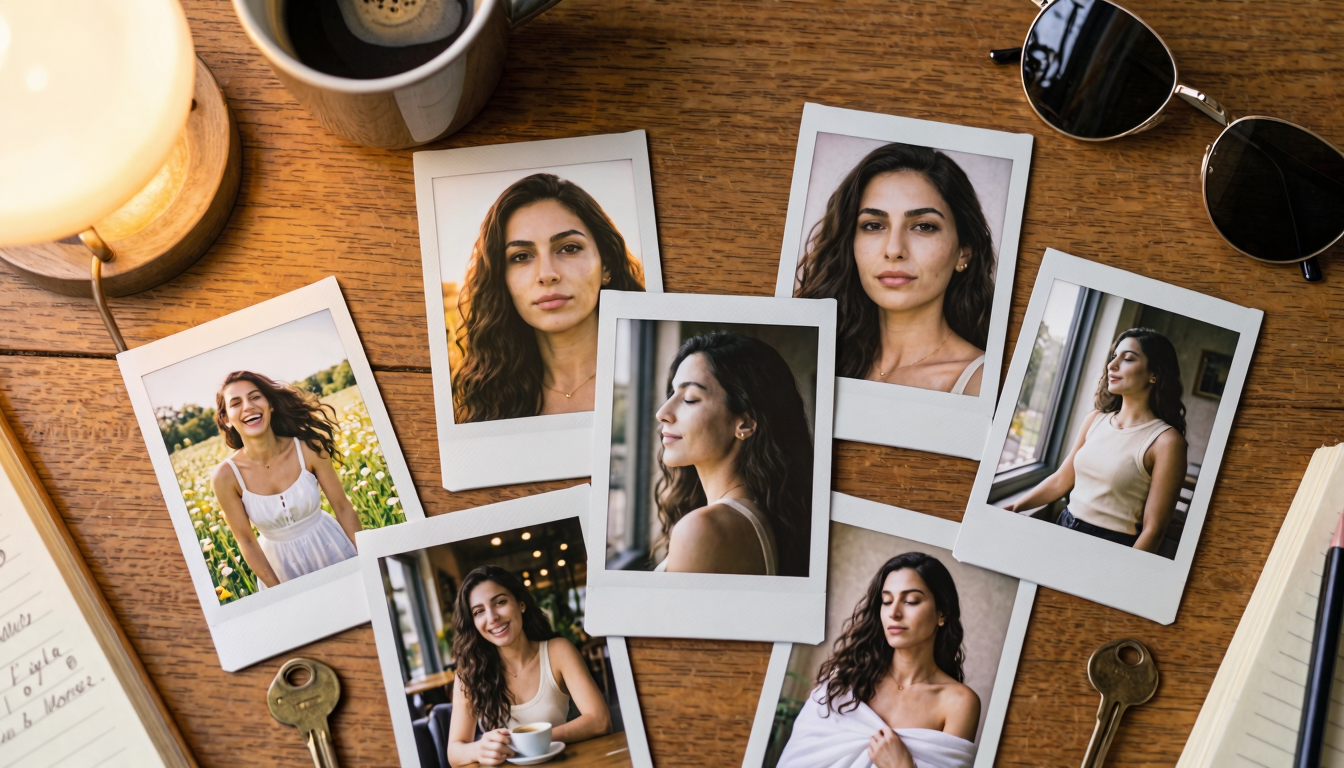
The worked example trains a character named Leyla — a Middle Eastern woman in her late twenties. The same flow works for any original-character LoRA: portrait artist, OC for fan-fiction, mascot for a product page, anything where you need the same person across many scenes without paying for a face-swap pipeline.
About the character. Leyla is a fully synthetic character — generated by Gemini (Nano Banana 2) from a text prompt specifically for this article. She isn't tied to any real project and isn't used anywhere else; any resemblance to a real person is purely coincidental. The trained LoRA is in the Downloads block at the bottom of the page — feel free to grab it and reuse her in your own tests or work.
Prerequisites
What you'll want set up before starting:
- A 16GB consumer GPU that runs Z-Image-Turbo locally — trained on an RTX 5060 Ti, but anything in the same class works (check your card →).
- Windows 10/11 (the workflow runs natively; Linux/macOS users adapt the paths).
- Access to an image-to-image generator that holds character identity from a single reference across many variations (this guide's dataset was made with Nano Banana 2 via Gemini).
- Python 3.10+ with Pillow installed (for the watermark crop helper in Step 3).
- ai-toolkit installed with CUDA-capable PyTorch — Step 5 covers two install paths.
- A working Z-Image-Turbo inference setup — see the Z-Image Turbo on RTX 5060 Ti recipe if you don't have one yet.
Why train a LoRA at all?
Z-Image-Turbo is excellent at generic prompts ("a woman with dark hair, studio lighting") but it has no idea who your character is. The non-LoRA workarounds each have a real catch:
- Image-to-image off a single reference, every time. The top closed vendors (Gemini's Nano Banana, GPT Image) actually do this well — quality is high, identity holds up. The problem isn't the technique, it's the economics and the gatekeeping: every generation is another API call, and at the dozens-to-hundreds scale a real project needs, that bill adds up fast. Worse, closed models periodically refuse perfectly safe prompts on a content-policy whim — and there's nothing you can do about it.
- A monstrous prompt block that re-describes the person on every call. Reads fine on paper, breaks in practice. Closed models (Gemini, GPT Image) don't expose a
seedparameter, so identical prompts give you a slightly different face every time. Even open models can't fully encode a specific identity through prose alone — you're always one outfit, lighting setup, or camera angle away from the model deciding your character looks "kind of different now." - A LoRA. A 60–200 MB file that lives on your disk, loads in milliseconds, and bakes identity into a trigger token. The model now "knows" your character. One prompt line gets you the same person in 50 different scenes — locally, with full seed control, no per-image API cost, no refusals.
The use cases this unlocks are broader than they look at first glance:
- Visual novels and illustrated stories — dozens of CG variations of a handful of recurring characters, with no per-frame cost or content-policy roulette.
- Image-to-video pipelines — generate a still with the LoRA, animate it with a local video model (Wan 2.1, LTX-Video, CogVideoX). Consistency upstream means consistency in the final clip.
- Virtual influencers and persona accounts — one character LoRA, deployed across hundreds of posts without ever needing the original reference shot or paying per-image.
- Character-driven content at scale — webcomics, illustrated blog series, social-media storylines, product mascots, anything where the same face has to appear over and over again.
Anywhere you need the same person across many scenes, a character LoRA pays back its training afternoon the first time you would have otherwise burned through an API quota or fought a closed model into compliance.
What you'll build
| Component | Value |
|---|---|
| Base model | Z-Image-Turbo (Tongyi-MAI, 6B params, distilled) |
| LoRA type | Character (face + identity, not style) |
| Training data | 30 photorealistic images, 1898×1898 PNG (after crop) |
| Trigger token | l3yla (leetspeak — see Step 4 for why) |
| Total training steps | 3000 |
| First usable samples | ~30 minutes in |
| Full training run | ~6 hours on RTX 5060 Ti (16GB) |
| Peak VRAM | ~16 GB — saturates the card; 16GB is the floor for this config |
| Output size | ~162 MB .safetensors |
Hardware & software baseline
The whole pipeline runs on a single workstation. The dataset generator lives in a browser tab (in whichever image-to-image service you prefer); everything else is local.
- GPU: any 16GB consumer card that already runs Z-Image-Turbo locally. This guide's LoRA was trained on an RTX 5060 Ti (16GB) — and VRAM stayed pegged at the 16 GB ceiling for the entire training run. 16GB is the floor for this batch-size/rank combination, not a comfortable fit. 12GB cards almost certainly need config trims to fit — drop rank, drop batch, add gradient accumulation — but those changes weren't tested for this guide (see "Fitting on less VRAM" at the end). Not sure about your card? Check with the GPU Advisor → — but remember training is heavier than inference, so an inference-tight card is going to be a fight to train on.
- OS: Windows 10/11. The same flow works on Linux; paths and the venv activation differ.
- Dataset generator: any image-to-image model that holds character identity across many generations from a single reference. This guide's dataset was made with Nano Banana 2 (via Gemini) — use whichever identity-preserving image generator you already have access to. Plan for ~30 generations per character.
- Trainer: ai-toolkit — Ostris's fine-tuning suite. It has a Z-Image-Turbo training config out of the box.
- Inference (for validation): the existing Z-Image-Turbo recipe (diffusers or ComfyUI).
Step 1 — Concept generation (base reference)
Note on the generator. Steps 1–4 use Gemini's Nano Banana 2 as the worked example — that's what was used to make Leyla. Any image-to-image tool that holds character identity across many generations from a single reference works the same way; adapt the wrapper-prompt syntax to your tool's conventions and you're done. The watermark crop in Step 3 only applies if your generator stamps a watermark — most closed models do, most open ones don't.
Pick one image — the base reference — and lock identity to it for the entire dataset. Keep this file simple, single subject, neutral pose, neutral lighting. Nothing dramatic, nothing the model has to "fix" later.
The winning prompt
Here's the actual text-to-image prompt that produced Leyla's base reference:
A photorealistic close-up portrait of a 29-year-old Middle Eastern woman with
long dark brown wavy hair and deep brown eyes, olive skin, defined eyebrows,
elegant neutral expression, three-quarter view, refined studio lighting, plain
dark neutral background, 85mm lens, high detail
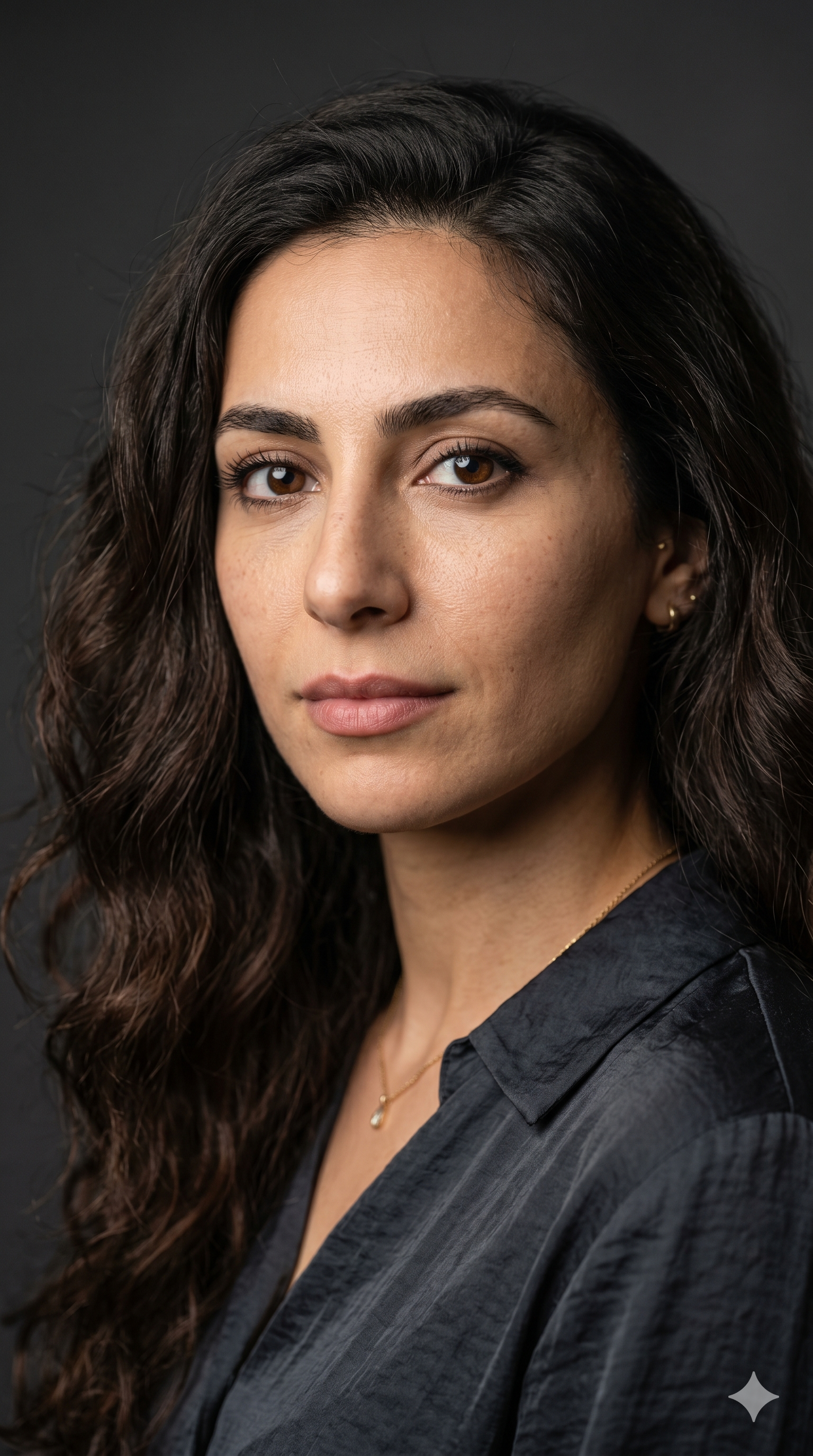
Save the result as leyla.png (~2048×2048). This file becomes the attached reference for every one of the 30 dataset prompts in Step 2.
Notice what's not in the prompt: no specific outfit, no dramatic lighting, no strong emotion, no specific pose beyond "three-quarter view". The base reference is deliberately neutral — its job is to give the model an unambiguous identity anchor that won't quietly bias every downstream generation toward a particular mood or outfit. The more loaded the reference, the more that load leaks into every one of your 30 dataset images.
If you regenerate the reference later — different face, different ethnicity — you also have to regenerate the 30-image dataset. The reference is the contract.
The other 4 concepts I sketched before picking Leyla
Before settling on the Middle Eastern reference, I sketched four other character concepts in Gemini — pure creative exploration of who the character could be. Concept generation is cheap (one image call per candidate, a few minutes total), so it's worth playing here. Here are the four I didn't pick — feel free to lift any of these prompts wholesale and follow the rest of the workflow to train an entirely different character LoRA.
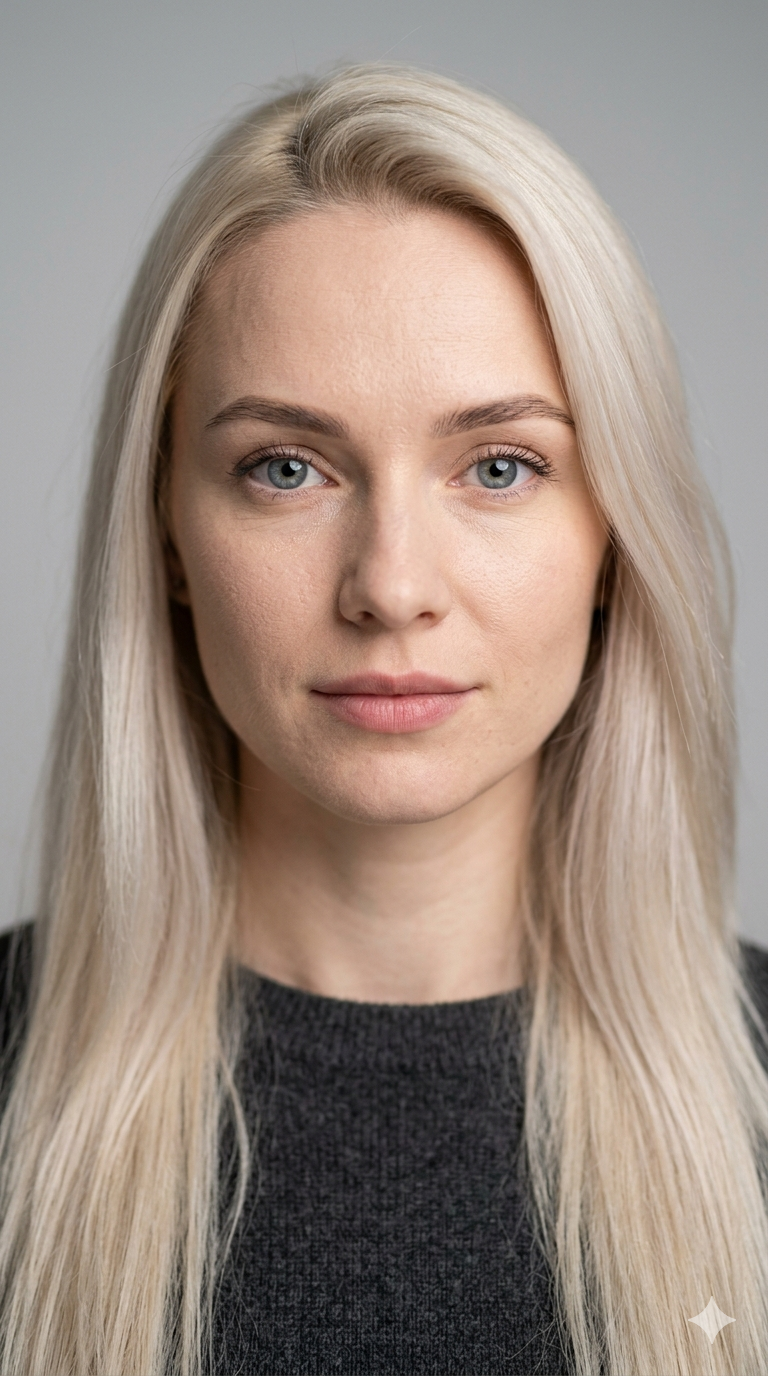
Candidate 1 — Eastern European
A photorealistic close-up portrait of a 27-year-old Eastern European woman with
long straight platinum blonde hair and blue-gray eyes, fair skin, soft natural
makeup, neutral calm expression, looking at camera, even softbox lighting,
plain light gray studio background, shot on 85mm lens, sharp focus on face
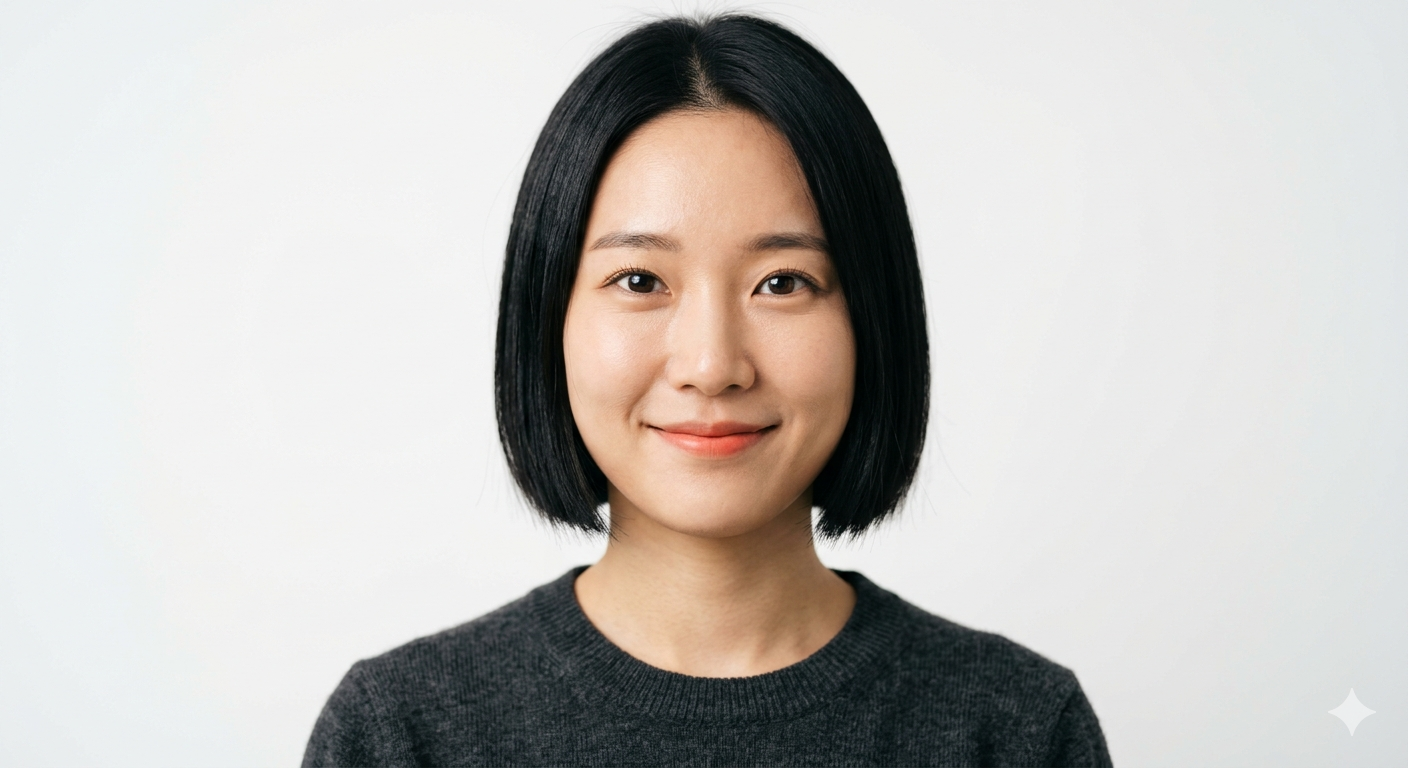
Candidate 2 — East Asian
A photorealistic close-up portrait of a 24-year-old East Asian woman with a
short straight black bob and dark brown eyes, smooth skin, minimal makeup,
slight friendly smile, frontal view, clean softbox lighting, plain white
studio background, 85mm lens, high detail
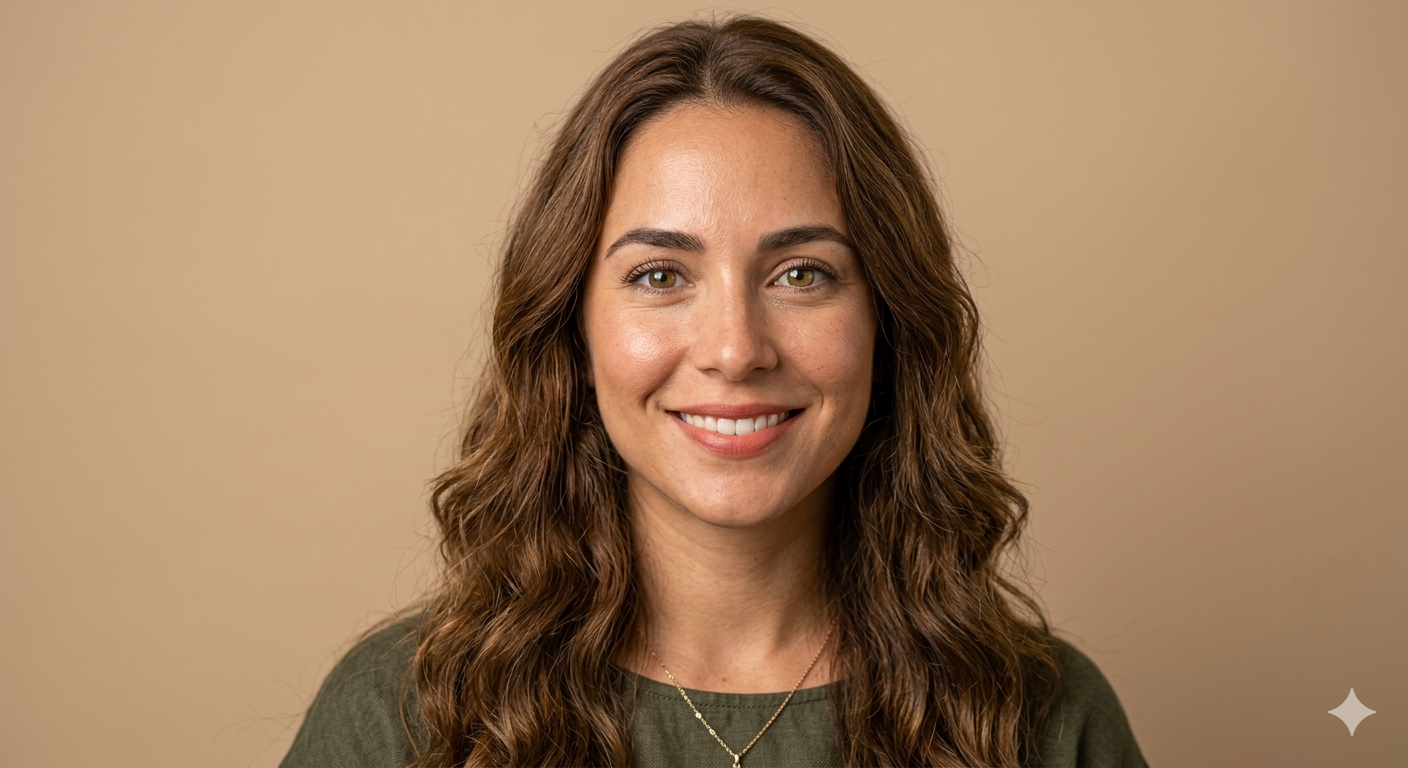
Candidate 3 — Latina
A photorealistic close-up portrait of a 28-year-old Latina woman with long wavy
chestnut brown hair and hazel eyes, sun-kissed skin, natural makeup, warm gentle
smile, frontal view, even studio lighting, plain warm beige background, 85mm
lens, photorealistic skin texture
Candidate 4 — Ginger
A photorealistic close-up portrait of a 25-year-old woman with shoulder-length
wavy ginger red hair, green eyes, pale freckled skin, no heavy makeup, soft
serene expression, slight head tilt, soft daylight studio lighting, plain
light gray background, 85mm lens, fine skin and freckle detail
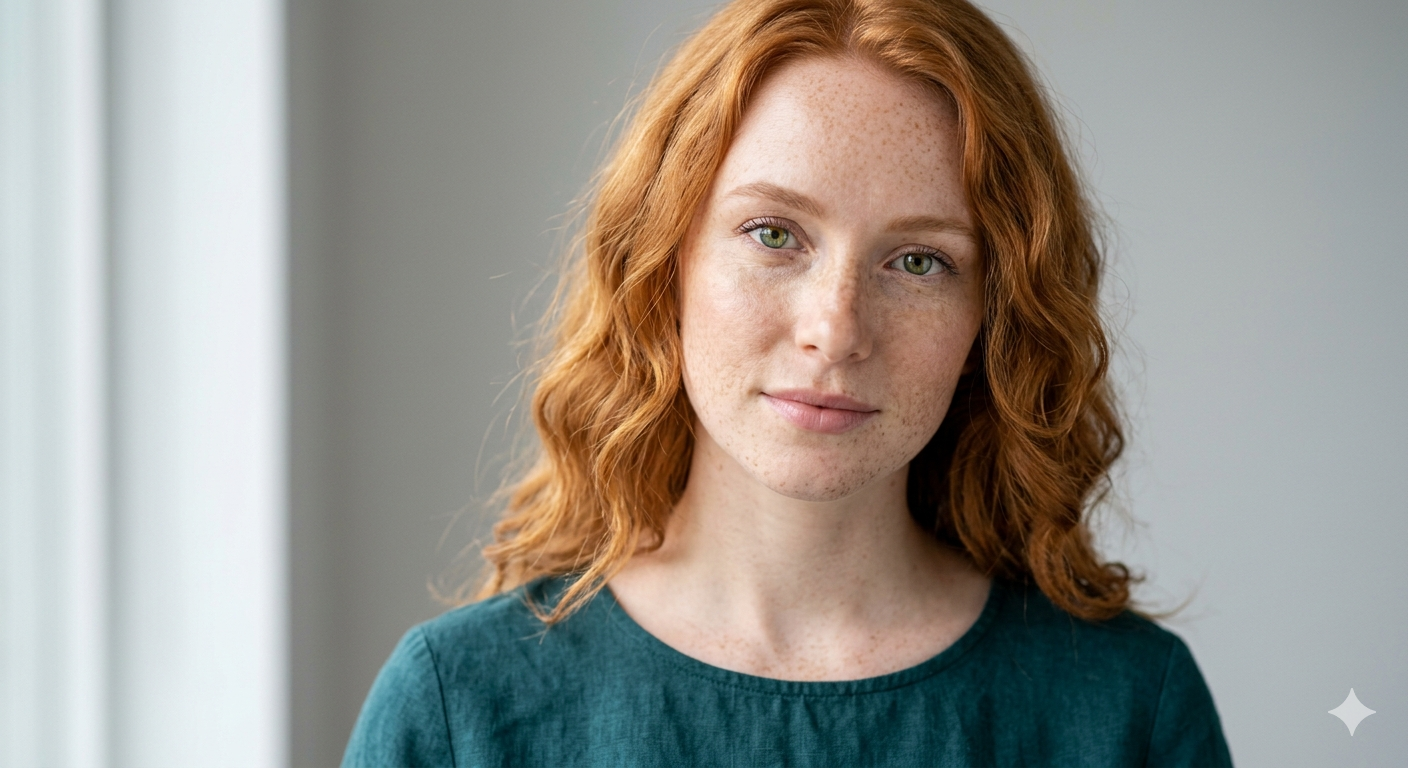
In the end I went with the Middle Eastern reference (Leyla, shown above) because she fit the visual world I had in mind. Nothing deeper than that — the other four are all valid characters, picking one was purely a creative call.
Step 2 — Dataset: 30 images, balanced
Composition is 10 / 10 / 10:
- 10 close-up portraits — head & shoulders, the face does ~80% of the frame.
- 10 medium shots — head to waist, clothing visible, more body language.
- 10 full body shots — full-figure, pose & outfit dominate.
One example from each tier (the full annotated 30-image dataset — PNGs paired with .txt captions — ships as a zip in the Downloads block; drop it into ai-toolkit if you want to reproduce the run end-to-end):
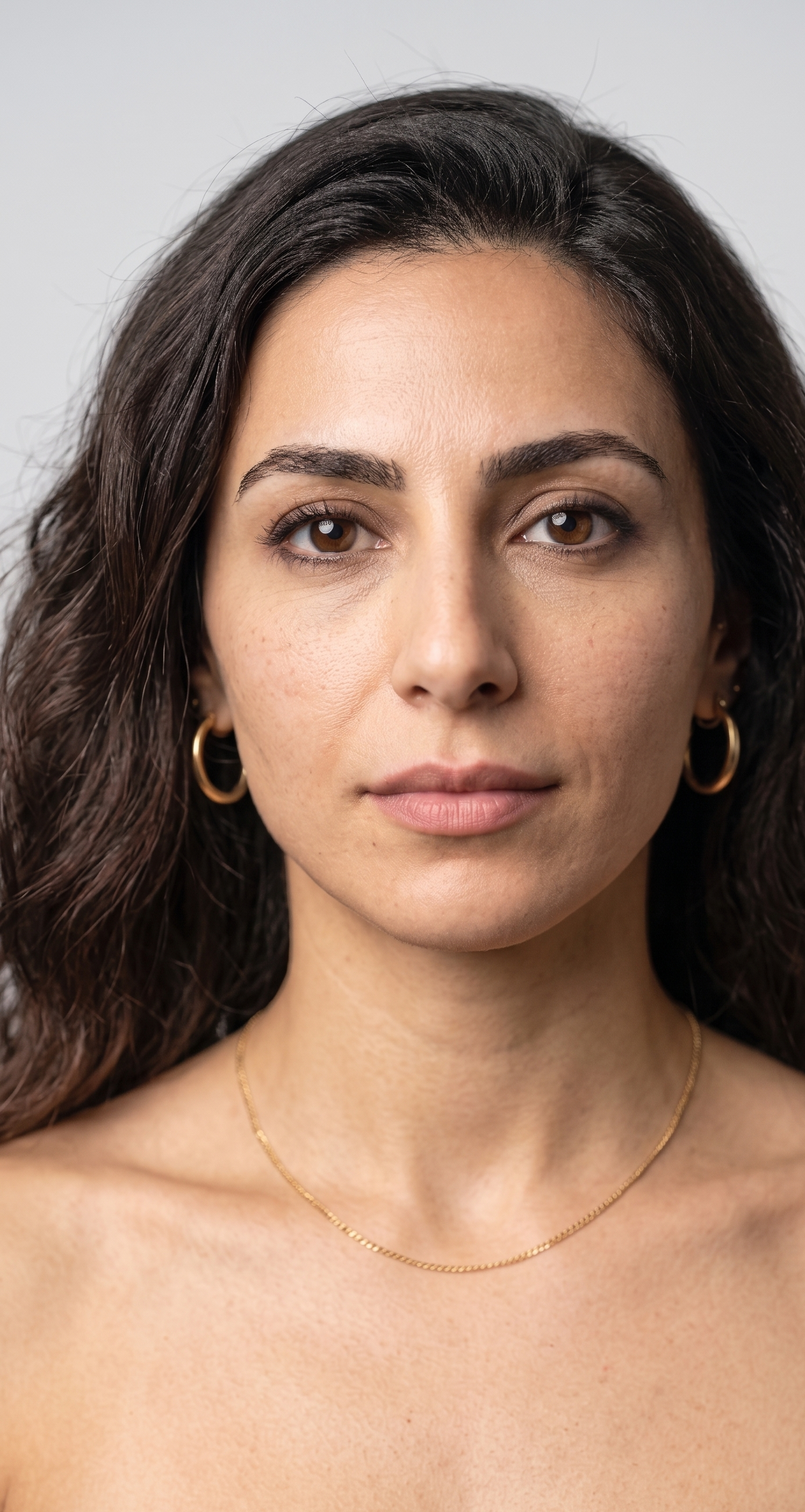
Close-up. Frontal, neutral expression, bare shoulders, light gray studio. The face fills most of the frame — this is where the LoRA learns face geometry and the identity-anchor features.

Medium shot. Arms crossed, white button-up shirt, white studio. Brings clothing and upper-body posture into the picture; the face is still a major element but no longer the entire frame.
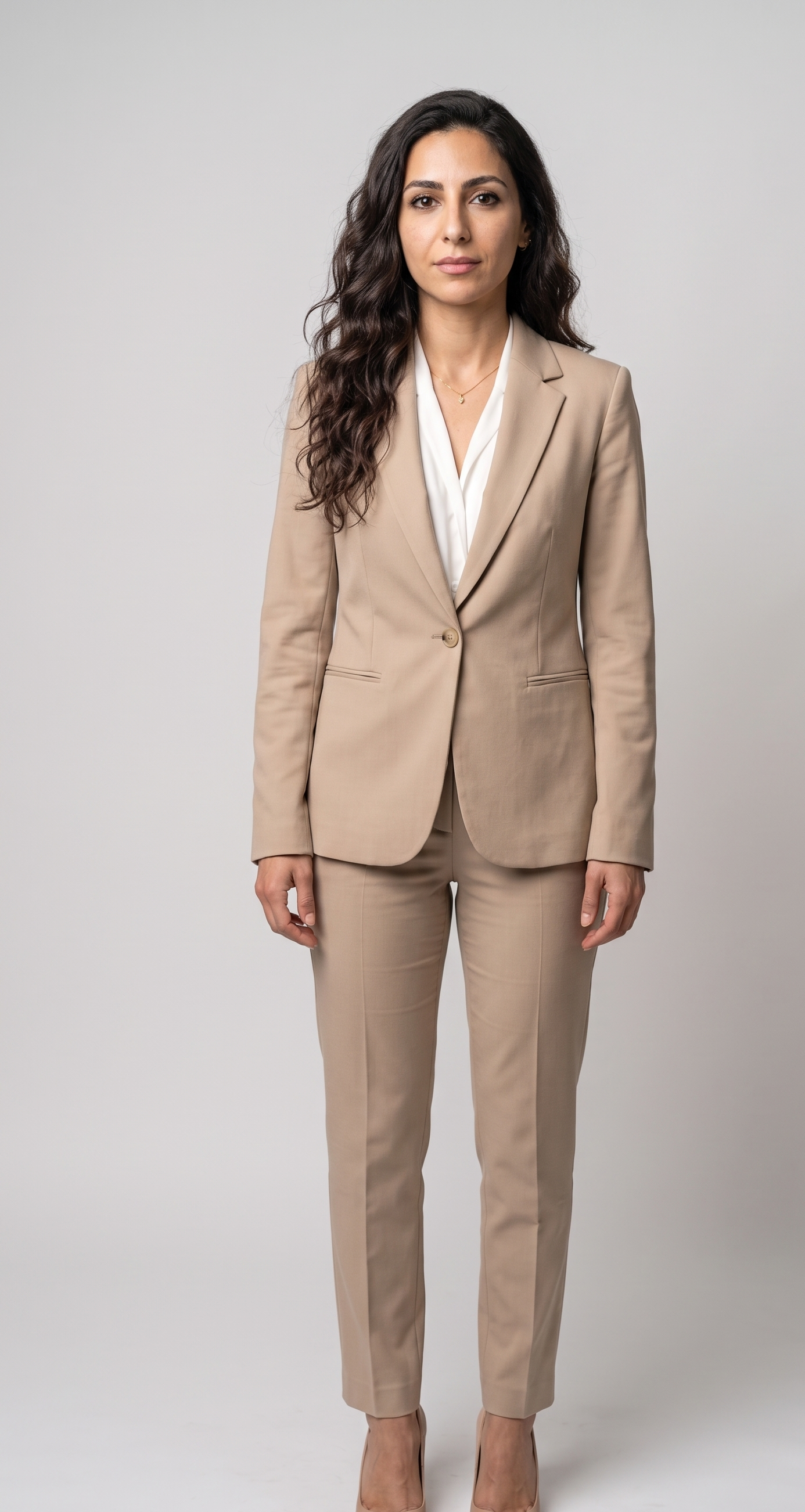
Full body. Standing with arms at sides, beige pantsuit, light gray studio. The whole figure — head-to-toe pose, outfit silhouette, stance — at the cost of face detail. The LoRA needs this tier to render the character convincingly at distance.
Why balanced and not "as many close-ups as possible"? Because the LoRA learns whatever you over-feed it. A dataset that's 25 close-ups + 5 full-body will fail at full-body prompts — the model has nothing to interpolate from. Each tier of distance teaches a different thing.
Batch composition rule (per block of 10)
Inside each block of 10, force diversity so the model sees the full range, not a narrow one:
- 2 profile shots (full side view — the LoRA needs to know the head's silhouette, not just the front).
- 1 "looking up, head tipped back, NOT laughing" (decouples the head-back pose from a laugh — without this the LoRA fuses the two and refuses to generate one without the other).
- Full emotional spectrum: laughing → joyful → smile → neutral → serious → contemplative → sad / melancholic. One image per emotion-band, no duplicates.
- 1 back view in portraits and 1 in full-body (so the LoRA learns head shape + body silhouette from behind).
The full 30-prompt set with paired captions is included with the LoRA download at the bottom of this guide — copy-paste-ready for Gemini.
Generating with Gemini (the wrapper)
Every prompt wraps the same appearance block (locks identity) with a per-image instruction (what changes):
Using the attached reference image, keep the exact same woman — identical face:
a Middle Eastern woman in her late twenties, long dark brown naturally wavy
voluminous hair parted slightly off-center and falling well past the shoulders,
deep dark brown almond-shaped eyes, full thick natural dark eyebrows, warm olive
skin with subtle natural texture and a light under-eye softness, straight nose,
full natural lips with a neutral nude tone, high cheekbones, oval face, minimal
natural makeup. Do not change her identity. Generate a close-up portrait photo
of her, frontal view, neutral expression, bare shoulders, gold hoop earrings,
thin gold chain necklace, light gray studio background. Photorealistic,
consistent lighting, same person.
Every prompt re-states the appearance block verbatim. If you tune the block (say, change "warm olive skin" → "light olive skin"), it lives in 30 places — use find-and-replace on the old block text to keep all prompts in sync. Drift in this block is the #1 cause of an inconsistent dataset.
(The captions you'll write in Step 4 for these same images are much shorter than this Gemini block — different consumer, different job. Step 4's cardinal rule explains why the caption identity line stays short on purpose.)
Step 3 — Crop the Gemini watermark
Skip this step if your generator doesn't stamp a watermark. Most open-source image-to-image tools don't; most closed ones do.
Gemini stamps a star watermark in the bottom-right corner of every generated image. Trainers don't care, but the watermark is a strong, repeating visual feature — and that's exactly the kind of thing a LoRA will gladly learn instead of (or in addition to) your character.
Solution: crop 150 px off the right and bottom edges of every PNG. 2048×2048 → 1898×1898, still well above the 1024×1024 minimum Z-Image expects. PNG, lossless.
The script lives in this guide's download bundle as crop_watermark.py:
python3 crop_watermark.py leyla-dataset --output leyla-dataset-cropped
Outputs to a separate folder so you keep the originals (in case you ever need to recover EXIF or re-crop differently).
Worth not skipping — a LoRA trained on watermarked images stamps the watermark on every inference output forever, and cleaning that up after the fact is painful.
Step 4 — Captioning: short, structured, token-led
Captions are the bridge between your images and the trainer. For each image in the dataset you write a short text description — usually one line — and save it alongside as a .txt file. During training the model sees the pair: "here's an image, here's how it's described in words." From thousands of those pairings it learns which words point at which visual features.
For a character LoRA, the single most important word in every caption is the trigger token (l3yla in this guide — more on why a leetspeak token below). The trainer's job is to bind that token to your character's identity, so when the token later appears in any inference prompt the model knows to render this person, in whatever scene you've described around the token.
Mechanically, each cropped PNG gets a paired .txt with the same filename stem: leyla-portrait-1.png ↔ leyla-portrait-1.txt. ai-toolkit picks these up automatically — drop the .txt files into the dataset folder alongside the PNGs and you're done.
Don't reuse your image-generation prompts as captions. They look similar but speak to two different consumers: the Gemini prompt describes the person to a model that doesn't know them (reference image plus detailed appearance text is what locks identity); the caption describes the scene to a trainer learning that the token is the identity. Paste the long appearance block into your caption and the LoRA learns "the description makes the face" instead of "the token makes the face" — a LoRA you can only use by typing out a paragraph of features in every inference prompt, which defeats the point. Captions stay short, token-led, and describe only the scene (pose, outfit, background), not the person. The cardinal rule below makes this concrete.
The trigger token
Use a leetspeak or otherwise-novel token (l3yla) rather than the character's real name (leyla). Reason: pre-trained Z-Image already knows the word "Leyla" — it has a baseline visual prior associated with that token. Training on top of that prior fights the existing representation and produces washed-out results. l3yla is a fresh slot in the token space: the LoRA writes to it cleanly without overwriting baseline knowledge. Same logic for any other real name — maria, anna, sarah — the model already has associations; use m4ria, 4nna, s4rah instead.
Good tokens are short, unique, and easy to type. A few that work: l3yla, m4ria, n1ka, al1na, ohwx (the classic DreamBooth default). Pick anything that's:
- (a) not a real word or name the model already knows
- (b) tokenises to 1–2 tokens (anything 4–6 characters is safe)
- (c) easy for you to remember and type — you'll write it 30 times here and every inference prompt afterwards
The trigger token lives only in the caption
.txtfiles — never in the image-generation prompts. The image generator (Step 2's wrapper) has no idea whol3ylais, so the token is noise to it. The trainer is the one learning the token. Putting the token in a generation prompt produces nothing useful and just clutters the dataset with a phantom word the model can't render.
Caption structure
<shot type> of l3yla, a woman with long dark brown wavy hair and deep brown eyes,
<pose>, <expression>, wearing <outfit>, <background>
Concrete examples (paired with images in this guide's bundle):
a close-up portrait photo of l3yla, a woman with long dark brown wavy hair and
deep brown eyes, frontal view, neutral expression, bare shoulders, gold hoop
earrings, thin gold chain necklace, light gray studio background

a medium shot photo of l3yla, a woman with long dark brown wavy hair and deep
brown eyes, arms crossed, neutral serious expression, wearing a white button-up
collared shirt, gold teardrop earrings, gold pendant necklace, white studio
background

a full body photo of l3yla, a woman with long dark brown wavy hair and deep
brown eyes, standing with arms at sides, neutral expression, wearing a beige
single-button pantsuit, nude pointed-toe heels, light gray studio background
The cardinal rule: tag what varies, don't tag what's identity
This is where most beginner LoRAs fail — and it has two sides.
Don't tag what's part of the character's identity. The token (l3yla) is already doing that job. Notice the identity line stays almost identical across all 30 captions: a woman with long dark brown wavy hair and deep brown eyes. That's it. Not the full Gemini appearance block; no cheekbones, eyebrow shape, skin tone, exact lip colour. Those features are the identity, and the token is what the trainer binds them to. If you re-describe the face in every caption, the LoRA learns "those descriptions make the face" instead of "the token makes the face" — a LoRA you can only use by pasting a paragraph of features into every inference prompt.
DO tag everything else that varies. Clothing — concretely (navy blue pantsuit, not vague casual outfit). Accessories — earrings, necklaces, watches, bracelets, bags. Background — light gray studio background, outdoor park with bokeh, dark moody background. Pose, expression, hand position, shoes, hair styling (when it varies between images). If you can see it and it changes from image to image, name it.
The trap: anything visible but untagged that recurs across many images quietly becomes part of the trigger token's identity. If Leyla wears gold hoop earrings in 25 of 30 dataset images and you never tag earrings in the captions, the LoRA decides gold hoops are part of who
l3ylais — and you'll get them in every inference, even when you ask for "no earrings". Same trap for a specific lip colour, a recurring hairstyle, a particular makeup palette, even a recurring background tone.
The rule restated cleanly:
- Identity, constant (face, eye colour, build, ethnic features) → don't tag — the token carries it.
- Everything else, variable (outfit, accessories, pose, background, expression, shoes) → tag explicitly.
If an element isn't visible in a given image — earrings hidden on a back view, clothing cropped off an extreme close-up — don't tag it. Concrete example: drop "and deep brown eyes" from the identity line on back-view shots or profiles where the eye isn't visible. Otherwise the LoRA learns that "eyes visible or not visible" is part of l3yla's identity, which is nonsense.
Note on automatic captioning. Many people use vision models — BLIP-2, LLaVA, Florence-2 locally, or hosted models like GPT Vision / Claude — to generate captions automatically. It's a real time-saver, but most of these tools default to tagging identity features (eye colour, skin tone, exact hair length, eyebrow shape) — exactly what a character-LoRA workflow doesn't want. If you go that route, run a manual cleanup pass: strip identity descriptors, insert the trigger token at the start of each line, verify the tag-what-varies / don't-tag-identity split. For ~30 images, manual captioning from the template above is fast and produces a cleaner result. For hundreds of images, auto + careful cleanup is the only practical path.
Step 5 — ai-toolkit setup (Windows)
If you're reading this section, your dataset is captioned and sitting in a folder, the watermarks are cropped, and you're emotionally committed. Good — that's exactly when you should fight the venv, not before.
ai-toolkit is Ostris's fine-tuning suite. It supports Z-Image and Z-Image-Turbo as first-class models and ships training configs that work out of the box — once you've got the environment together. Two paths to get there:
Path A — manual install (recommended if you like full control)
Straight from the official README. Python 3.10+ required (3.12 recommended); PowerShell or cmd.exe works on Windows.
git clone https://github.com/ostris/ai-toolkit.git
cd ai-toolkit

python -m venv venv
.\venv\Scripts\activate

pip install --no-cache-dir torch==2.9.1 torchvision==0.24.1 torchaudio==2.9.1 --index-url https://download.pytorch.org/whl/cu128
pip install -r requirements.txt
cu128 means the PyTorch wheels target CUDA 12.8. If your driver is older you'll need to either update the driver or pick a different cu** index — see PyTorch's install matrix.
Path B — Easy-Install bundle (recommended if you've hit Windows pain)
The official ai-toolkit README itself points Windows users at Tavris1/AI-Toolkit-Easy-Install — a maintained single-.bat installer that bundles a portable Python 3.12, PyTorch 2.9.1 + CUDA 12.8, Triton, git, Node.js, and the latest ai-toolkit checkout. As of v0.5.2 (April 2026) it's actively updated and known to work.
How to use:
- Download the
.batfrom the releases page. - Drop it in a fresh folder. Important: not in
Program Files, not underC:\root, no spaces or special characters in the path. Standard Windows installer hazards apply — long paths, ACL quirks, the usual. - Run the
.bat(without Administrator mode). It downloads everything, builds the environment, and gives you a launcher.
Trade-off vs. Path A: Easy-Install is a black box — you get a working environment fast, but you give up some understanding of what's installed where. If you want to be able to debug a broken venv later, Path A pays off.
Pick one, don't do both. Mixing the bundled environment with a hand-rolled venv in the same folder is a great way to wake up at 2 AM debugging which
python.exeis actually running.
The training adapter (Z-Image-specific, easy to miss)
Z-Image-Turbo is a distilled model — it generates great images in 8 steps because the original 30+ step trajectory was compressed into a small one. That distillation creates a problem for LoRA training: gradients on a distilled checkpoint don't behave the way they do on the un-distilled base, so naïve fine-tuning produces "Turbo Drift" — quality and identity degrade in unexpected ways.
The fix is a small training adapter that temporarily reverses the distillation during training. You load it alongside the base model and your LoRA, do the training, then drop the adapter at inference time and ship only the LoRA. ai-toolkit ships two versions:
training_adapter_v1.safetensors— the default, well-tested.training_adapter_v2.safetensors— experimental, may give different (better or worse) results on your data; worth A/B-testing if you have time.
For Leyla, the default v1 adapter was used, auto-resolved by the Web UI from the HuggingFace repo ostris/zimage_turbo_training_adapter — no manual download or local-path wrangling needed if you go through the UI (Path A users may need to download it explicitly the first run; the UI handles it).
Register the dataset in ai-toolkit (do this before configuring the training job)
ai-toolkit treats datasets as named, pre-registered entities — you don't point a training job at a folder, you point it at a named dataset you've already loaded into the UI. So before opening "New Training Job," do this:
- Open the Datasets page in the ai-toolkit UI sidebar.
- Click New Dataset (or whatever the equivalent "add" button is in your version of the UI).
- Drag the entire
leyla-dataset-cropped/folder onto the upload zone — PNGs and paired.txtcaptions in one batch. ai-toolkit pairs them by filename stem automatically:leyla-portrait-1.png↔leyla-portrait-1.txt. Don't upload images individually and then add captions one by one; you already paired them on disk in Step 4, let the UI ingest the lot in one shot. - Give the dataset a name —
leyla. - Done. The dataset now appears in the Target Dataset dropdown of the training job form.
That's the entire "upload to ai-toolkit" step. The drag-and-drop batch is the time-saver — for 30 paired files it's a single drop versus 60 individual file selections.
Setting up the training job (Web UI walkthrough)
ai-toolkit ships with a browser-based UI (Path B's Easy-Install launches it automatically; Path A users start it manually with npm run build_and_start from the ui/ folder, requires Node 20+). You can also drive everything from YAML on the CLI — see the YAML fallback further down — but the UI is the smoother path on Windows, and what this section walks through.
Open the UI, click New Training Job, pick LoRA Trainer from the dropdown in the top-right. You'll see a form split into panels.
The configuration that produced Leyla, panel by panel:
JOB
| Field | Value | Note |
|---|---|---|
| Training Name | leyla-z-image-turbo | Whatever you want — used for the output folder name. |
| GPU ID | GPU #0 | If you have one GPU there's no choice to make. |
| Trigger Word | l3yla | The token from Step 4. Must match the token you put in every caption. |
MODEL
| Field | Value | Note |
|---|---|---|
| Model Architecture | Z-Image Turbo (w/ Training Adapter) | The bundled "with training adapter" variant — this handles the Turbo Drift fix automatically. |
| Name or Path | Tongyi-MAI/Z-Image-Turbo | The base model on HuggingFace; ai-toolkit downloads it on first run. |
| Training Adapter Path | ostris/zimage_turbo_training_adapter | HF repo for the adapter weights; auto-resolved by the UI, no manual download needed. |
| Low VRAM | off | Toggling it on saves memory but slows training; on a 16GB card with this config it isn't needed. |
| Layer Offloading | off | Trades speed for VRAM headroom; not needed here either. The warning icon on the toggle is a "may slow training significantly" hint from ai-toolkit. |
Heads up: with both toggles off and rank 32, VRAM sits at the 16 GB ceiling for the whole run (covered in TL;DR). If you OOM, the first thing to try is flipping Low VRAM on — you'll lose some training speed but get back ~1–2 GB of headroom.
QUANTIZATION
| Field | Value | Note |
|---|---|---|
| Transformer | float8 (default) | Z-Image's transformer trained/loaded in float8 for memory efficiency. Default is what you want. |
| Text Encoder | float8 (default) | Same — default is correct. |
Higher precisions (fp16/bf16) cost VRAM you don't have on a 16 GB card; lower (int4) is for inference, not training.
TARGET
| Field | Value | Note |
|---|---|---|
| Target Type | LoRA | What we're training. |
| Linear Rank | 32 | Higher rank = more capacity for the LoRA to encode identity, more VRAM, larger output file. 32 is comfortable on this config; 8–16 is the published "safe starting" range if you want a smaller file. |
SAVE
| Field | Value | Note |
|---|---|---|
| Data Type | BF16 | bfloat16 — half-precision floats, standard for LoRA checkpoints. |
| Save Every | 250 | Save a checkpoint every 250 training steps. With 3000 total steps that's 12 checkpoints — plenty to pick a "best" one from in Step 7. |
| Max Step Saves to Keep | 4 | Rolling window — keeps only the 4 most recent step-saves to bound disk usage. Earlier checkpoints get overwritten. Caveat: if you want to compare early vs late LoRAs in Step 7's validation grid, bump this to 10+ or you'll lose the early ones. |
The next panel down is TRAINING — the optimizer, learning rate, total steps, and a handful of advanced toggles. For Leyla this was all stock defaults; nothing here was touched.
TRAINING
| Field | Value | Note |
|---|---|---|
| Batch Size | 1 | Single image per training step. With 16 GB VRAM and rank 32, batch 1 is the only option that fits. |
| Gradient Accumulation | 1 | No accumulation. Increase (e.g. 4–8) if you want the gradient signal of a larger batch on a memory-constrained card. |
| Steps | 3000 | Total training steps. ~10× the dataset size is the published sweet spot for 20–30-image sets. |
| Optimizer | AdamW8Bit | 8-bit AdamW from bitsandbytes — saves roughly 1 GB of optimizer-state VRAM vs. full-precision AdamW. ai-toolkit's default on consumer GPUs. |
| Learning Rate | 0.0001 (1e-4) | Standard LoRA learning rate for diffusion fine-tunes. Drop to 5e-5 if Step 7's validation grids show overfitting. |
| Weight Decay | 0.0001 (1e-4) | Mild L2 regularization on LoRA weights. Default — no reason to change for a single-character LoRA. |
| Timestep Type | Sigmoid | How the trainer samples timesteps along the noise schedule each step. Default; alternatives are research-y. |
| Timestep Bias | Balanced | Even weighting across early vs late timesteps. Default. |
| Loss Type | Mean Squared Error | Standard diffusion training loss. Default. |
| EMA — Use EMA | off | Exponential moving average of weights. Smoother convergence but doubles weight-storage VRAM; not worth it for a character LoRA. |
| Text Encoder — Unload TE | off | Releases the text encoder from VRAM after captions are encoded. |
| Text Encoder — Cache Text Embeddings | off | Pre-computes caption embeddings once, then drops the text encoder. Saves ~1–2 GB of VRAM in combination with Unload TE. |
| Regularization — Differential Output Preservation | off | Penalises the LoRA for changing base-model outputs on unrelated prompts. Useful for broad fine-tunes, overkill for one character. |
| Regularization — Blank Prompt Preservation | off | Similar idea — penalises drift on empty/null prompts. Off by default. |
The TRAINING panel is "don't touch unless you have a specific reason". Every value here is stock ai-toolkit, and stock works. If you do hit OOM during training, the first lever to pull is Unload TE + Cache Text Embeddings together — they free ~1.5–2 GB of VRAM by evicting the text encoder once captions are encoded. The trade-off is that you can't re-tune captions mid-run.
Next panel down is DATASETS — where you point the trainer at the named dataset you registered in the previous subsection.
DATASETS — Dataset 1
| Field | Value | Note |
|---|---|---|
| Target Dataset | leyla | Pre-registered name from the Datasets page (see prep step above). |
| LoRA Weight | 1 | Relative weight when mixing multiple datasets (e.g. character + style set). Single dataset → 1. |
| Num Repeats | 1 | Times each image is seen per epoch. With 30 images × 1 repeat × batch 1, one epoch = 30 steps. 3000 total steps means ≈ 100 epochs — plenty of exposure per image. |
| Default Caption | (empty) | Fallback for any image with no paired .txt. We have a caption for every PNG, so this stays blank. |
| Caption Dropout Rate | 0.05 | 5% of the time the caption is replaced with an empty string during training. Mild regularization that helps the LoRA generate the character from short prompts. Standard low value. |
| Settings — Cache Latents | off | If on, pre-computes and caches VAE latents on disk for a noticeable training speedup. Off here means latents are encoded every step. Trade-off: enable to go faster, disable to save ~1–2 GB of cache space. |
| Settings — Is Regularization | off | Marks the dataset as a "preserve the base class" anchor. Off — Leyla is the main training data, not a regulariser. |
| Flipping — Flip X | off | Horizontal flip. Deliberately off for character LoRAs. Faces and outfits have real asymmetries (hair parting, an earring on only one ear, asymmetric features), and flipping teaches the LoRA those are arbitrary noise. Flip X is a free 2× augmentation for landscapes and textures — but actively harmful here. |
| Flipping — Flip Y | off | Vertical flip. Almost never useful for portraits — upside-down faces aren't a real prompt target. |
| Resolutions | 512, 768, 1024 enabled · 256 / 1280 / 1536 off | Multi-resolution training — each image is bucketed and presented at every enabled resolution. The selected three cover the common inference sizes without blowing up VRAM the way the upper two would; 1024 is Z-Image-Turbo's native sweet spot. |
About multi-resolution. Each extra enabled resolution costs VRAM and training time, but buys the LoRA the ability to render the character at that size. 512/768/1024 is a sensible default — if you only ever generate at 1024 you could leave just 1024 and shave a bit off the wall-clock; if you want SDXL-style 1280/1536 support you can enable those, but expect VRAM to spill.
The last panel is SAMPLE — what the trainer generates as preview images at each checkpoint, so you can watch the LoRA learn in real time and feel the training instead of staring at a loss number.
Use the trigger token in every sample prompt from the very first sample. This is technically optional — ai-toolkit will dutifully sample whatever you put — but it's the single highest-value setting in this panel. Without the token, every preview generates a generic person from the base model, and you can't see your LoRA evolving. With the token, each saved checkpoint produces 10 visual data points of "how close are we to actually rendering Leyla". You see the character emerging out of noise across the run. That live feedback loop is the thing that turns a 6-hour training session from a wait into something you actually want to watch.
SAMPLE — top-level settings
| Field | Value | Note |
|---|---|---|
| Sample Every | 250 | Generate previews every 250 training steps — matches Save Every, so each checkpoint has its preview pass. |
| Sampler | FlowMatch | Z-Image-Turbo's native flow-matching scheduler. No reason to switch unless you have a specific one. |
| Guidance Scale | 1 | CFG = 1 means no classifier-free guidance. Correct for distilled Turbo models — guidance is baked in, adding more on top degrades quality. |
| Sample Steps | 8 | Z-Image-Turbo's native inference step count. 8 NFE is the sweet spot the distillation targets. |
| Width × Height | 1024 × 1024 | Native resolution. Per-prompt overrides available if you want to test the LoRA at 512 or 768. |
| Seed | 42 | Base seed. Combined with Walk Seed below, each prompt and each sampling pass gets a deterministic variation. |
| Walk Seed | on | The seed walks across prompts and across sampling sessions, so previews show prompt × noise variation, not just model evolution on the same fixed noise. |
| Skip First Sample | on | Don't sample at step 0. The LoRA hasn't learned anything yet — first-step samples are just base-model output, useless and slow. |
| Force First Sample | off | Override that would sample at step 0 anyway (useful only when debugging the sampling pipeline itself). |
| Disable Sampling | off | Master kill-switch for the whole preview pipeline. Off — we want previews. |
Sample Prompts (10)
Each prompt card has its own Width, Height, Seed, and LoRA Scale fields, all defaulted to inherit from the top settings. The seeds increment automatically — 42, 43, 44, 45, … — so each prompt has distinct noise and you don't see the same composition ten times.
A naming heads-up: ai-toolkit uses three different names for related-but-distinct LoRA-influence knobs —
LoRA Weightin DATASETS (dataset-mixing weight when training on multiple sets),LoRA Scalehere in SAMPLE (per-prompt preview-time scale), andstrengthlater in inference workflows (how strong the LoRA's influence is when you actually generate with it). Three names, three roles. The values aren't interchangeable.
The first four of Leyla's sample prompts:
1. a full body photo of l3yla lying on a white bed in a sunlit bedroom,
   soft morning light through window, holding a book, calm relaxed
   expression, wearing a navy silk pajama set

2. a full body photo of l3yla dancing in a vibrant nightclub, arms
   raised above her head, joyful laughing expression, wearing a red
   sequin mini dress, neon purple and blue lighting

3. a medium shot photo of l3yla with a skeptical raised eyebrow
   expression, arms crossed in front of her chest, wearing a maroon
   hoodie, modern home office background

4. a close-up portrait photo of l3yla with tears on her cheeks, sad
   weeping expression, looking down, wearing a navy turtleneck, blurred
   rainy window in background
The remaining 6 sample prompts
5. a full body photo of l3yla sitting cross-legged on a yoga mat in a
   meditation pose, palms resting on knees, eyes closed, serene peaceful
   expression, wearing teal athletic wear, sunlit yoga studio with
   wooden floor

6. a full body photo of l3yla cycling through a city park on a bicycle,
   mid-stride pedaling, wide bright smile, wearing a yellow windbreaker
   and grey cycling shorts, spring greenery and bokeh background

7. a medium shot photo of l3yla leaning her elbow on a wooden railing
   of an oceanside balcony, gazing out, contemplative thoughtful
   expression, wearing an oversized white linen shirt, ocean and golden
   hour sky in background

8. a full body side profile photo of l3yla walking on a stone bridge,
   neutral calm expression, wearing a burgundy peacoat over a black
   dress and brown ankle boots, autumn river and stone wall in
   background

9. a medium shot photo of l3yla holding a coffee mug in both hands,
   skeptical squinted expression with a slight smirk, wearing a chunky
   gray cable-knit sweater, rustic cafe interior with exposed brick

10. a full body photo of l3yla cooking at a modern kitchen island,
    focused concentrated expression with a slight smile, chopping
    vegetables with a knife, wearing a striped chambray apron over a
    white t-shirt and jeans, sunlit kitchen with marble countertops and
    pendant lights
The full set also ships verbatim in the download bundle as leyla-sample-prompts.txt, copy-paste ready.
The underlying design principle — and why this set is useful as a training preview rather than just 10 random prompts:
Every prompt deliberately tests something the training dataset doesn't contain. New poses (yoga cross-legged, cycling mid-stride, lying on a bed, leaning on a railing). New activities (dancing, chopping vegetables, cycling). New expressions (skeptical raised eyebrow, weeping tears). New object interactions (coffee mug, knife, book, bicycle). New contexts (bedroom, nightclub, kitchen, bridge, ocean balcony). The dataset is 30 studio portraits at neutral lighting; the prompts above are everything but that. A LoRA that nails training-style prompts but breaks on this set is overfit to the dataset — and that's exactly what the rolling preview lets you catch as it happens.
Within that umbrella, the concrete moves:
- Every prompt starts with
l3yla— the trigger token is doing its job in every sample. - All three shot tiers represented — full body, medium, close-up — so you can watch each tier learn at its own rate (close-ups usually converge first, full-body last).
- Full emotional range — calm, joyful laughing, skeptical, sad weeping, serene, contemplative, focused. If the LoRA can't generate weeping-Leyla even when the dataset has sad-Leyla, you'll see it in the preview.
- Outfits the dataset doesn't have — silk pajamas, sequin dress, hoodie, turtleneck, peacoat, apron — none in the 30 training images. Seeing them render correctly on Leyla's face is the proof that the LoRA learned the character, not the wardrobe.
- Distinct contexts — bedroom, nightclub, kitchen, bridge, ocean balcony, cafe. The LoRA shouldn't think Leyla only exists in a light gray studio.
That's the same general approach Step 7 uses for the post-training validation grid — same prompts, same seeds, swept across checkpoints to pick a winner. Reusing the sample-prompt set is fine and saves you from writing two prompt sets.
"Show Advanced" — left at defaults. Every knob exposed by the top-right Advanced toggle was kept at its ai-toolkit-out-of-the-box value for this run. Nothing custom under the hood worth documenting; the screenshots above cover everything.
Once every panel is filled in, hit Create Job (top-right). The UI saves the config and kicks off training — Step 6 covers what to watch as it runs.
YAML config fallback (for CLI users)
If you'd rather drive ai-toolkit from the command line, the same parameters live in a YAML file (with a few extras the UI hides behind sensible defaults — linear_alpha, train_unet, gradient_checkpointing, etc.). Drop one into config/ and run:
python run.py config/leyla-z-image-turbo.yaml
Full YAML config (~70 lines)
A skeleton matching the UI values above:
# leyla-z-image-turbo.yaml — character LoRA on Z-Image-Turbo
job: extension
config:
  name: leyla-z-image-turbo
  process:
    - type: sd_trainer
      training_folder: output
      device: cuda:0
      trigger_word: l3yla
      network:
        type: lora
        linear: 32                                       # matches UI "Linear Rank"
        linear_alpha: 32
      save:
        dtype: bf16
        save_every: 250                                  # matches UI "Save Every"
        max_step_saves_to_keep: 4
      datasets:
        - folder_path: /path/to/leyla-dataset-cropped    # TODO: your captioned dataset folder
          caption_ext: txt
          caption_dropout_rate: 0.05
          num_repeats: 1
          flip_x: false                                  # asymmetries matter for characters
          flip_y: false
          cache_latents_to_disk: false                   # flip true for speed, false for disk savings
          is_reg: false
          resolution: [512, 768, 1024]                   # multi-resolution buckets
      train:
        batch_size: 1
        gradient_accumulation_steps: 1
        steps: 3000
        train_unet: true
        train_text_encoder: false
        gradient_checkpointing: true
        noise_scheduler: flowmatch
        optimizer: adamw8bit
        lr: 1e-4
        weight_decay: 1e-4
        dtype: bf16
        loss_type: mse                                   # matches UI "Loss Type"
        timestep_type: sigmoid                           # matches UI "Timestep Type"
        timestep_bias: balanced                          # matches UI "Timestep Bias"
      model:
        name_or_path: Tongyi-MAI/Z-Image-Turbo
        adapter_path: ostris/zimage_turbo_training_adapter
        quantize: true                                   # float8 transformer + text encoder
      sample:
        sampler: flowmatch
        sample_every: 250
        width: 1024
        height: 1024
        seed: 42
        walk_seed: true                                  # matches UI "Walk Seed"
        skip_first_sample: true                          # matches UI "Skip First Sample"
        guidance_scale: 1.0
        sample_steps: 8
        prompts:
          # Each prompt starts with the trigger token, mixes shot tier,
          # and stretches the LoRA into poses / outfits / contexts /
          # expressions the dataset doesn't contain. Seeds walk
          # automatically (43, 44, ...) when walk_seed is on.
          - "a full body photo of l3yla lying on a white bed in a sunlit bedroom, soft morning light through window, holding a book, calm relaxed expression, wearing a navy silk pajama set"
          - "a full body photo of l3yla dancing in a vibrant nightclub, arms raised above her head, joyful laughing expression, wearing a red sequin mini dress, neon purple and blue lighting"
          - "a medium shot photo of l3yla with a skeptical raised eyebrow expression, arms crossed in front of her chest, wearing a maroon hoodie, modern home office background"
          - "a close-up portrait photo of l3yla with tears on her cheeks, sad weeping expression, looking down, wearing a navy turtleneck, blurred rainy window in background"
          - "a full body photo of l3yla sitting cross-legged on a yoga mat in a meditation pose, palms resting on knees, eyes closed, serene peaceful expression, wearing teal athletic wear, sunlit yoga studio with wooden floor"
          - "a full body photo of l3yla cycling through a city park on a bicycle, mid-stride pedaling, wide bright smile, wearing a yellow windbreaker and grey cycling shorts, spring greenery and bokeh background"
          - "a medium shot photo of l3yla leaning her elbow on a wooden railing of an oceanside balcony, gazing out, contemplative thoughtful expression, wearing an oversized white linen shirt, ocean and golden hour sky in background"
          - "a full body side profile photo of l3yla walking on a stone bridge, neutral calm expression, wearing a burgundy peacoat over a black dress and brown ankle boots, autumn river and stone wall in background"
          - "a medium shot photo of l3yla holding a coffee mug in both hands, skeptical squinted expression with a slight smirk, wearing a chunky gray cable-knit sweater, rustic cafe interior with exposed brick"
          - "a full body photo of l3yla cooking at a modern kitchen island, focused concentrated expression with a slight smile, chopping vegetables with a knife, wearing a striped chambray apron over a white t-shirt and jeans, sunlit kitchen with marble countertops and pendant lights"
The skeleton above mirrors the UI values shown in this section. Easy-Install's UI also writes the actual per-job config to disk (typically under ai-toolkit/output/<job-name>/config.yaml or similar) — if you want to drive subsequent runs from the CLI without re-clicking through the form, grab that file as your starting point.
Windows gotchas (worth knowing before you run)
A few things that commonly bite on a Windows install — not all will hit you, but knowing the shape of the failure modes saves debugging time:
- Long path support — Windows historically caps paths at 260 chars; ai-toolkit's nested dependency trees can blow past that. Enable long paths in Group Policy or via registry (
HKLM\SYSTEM\CurrentControlSet\Control\FileSystem\LongPathsEnabled = 1). - MSVC build tools — some pip deps compile native code; if you don't have Visual Studio C++ Build Tools installed, the install will fail mid-way through. Microsoft ships them as a standalone download.
- bitsandbytes / triton on Windows — historically painful; current ai-toolkit pins versions that should work, but worth checking the ai-toolkit Issues if you hit an import error.
- CUDA driver vs PyTorch CUDA version —
cu128PyTorch needs driver 525+ on Linux / 528+ on Windows. Checknvidia-smibefore youpip installtorch. - Antivirus / Defender — some bundled binaries (Triton kernels, compiled CUDA libs) trigger false-positive scans during first run. Expect a few "Allow" clicks.
Step 6 — Train
This step is mostly not doing things.
In the UI, hit Create Job (top-right of the form from Step 5). On the CLI, kick it off explicitly:
python run.py config/leyla-z-image-turbo.yaml
Either way, the same thing happens: ai-toolkit downloads anything missing (the Z-Image-Turbo base model on first run, the training adapter, the VAE), spins up the trainer, and starts grinding through steps. The first few minutes are the noisy ones — model loading, VAE warmup, the first batch landing on the GPU — after which the console settles into a steady rhythm of step N / 3000 — loss X — it/s Y.
What to actually do at this point: confirm it's running, then walk away.
A 60-second sanity check covers it:
- Console is emitting step lines (not stuck on a download or an error trace).
- Loss is a real number (not
NaNorinf) and it's roughly decreasing over the first hundred steps. nvidia-smiin another terminal shows the GPU is genuinely working — utilization near 100%, VRAM near its ceiling (~16 GB on a 5060 Ti at this config). If utilization is sitting low, something's mis-configured (likely a CPU-side bottleneck or wrong dtype).- The first preview samples land at step 250 (or whenever Sample Every is set). They'll look mostly like generic base-model output the first round or two — that's normal; the LoRA hasn't learned much yet.
Once those four boxes are ticked, close the terminal window and go do something else for ~6 hours. The training does not require supervision. There's no curve to babysit, no early-stopping decision to make in real time — that's what Step 7's validation grid is for, after the run is done.
On an RTX 5060 Ti at the config from Step 5, the full 3000-step run takes roughly 6 hours. The first usable preview samples drop at the ~30-minute mark (covered in TL;DR) — if you want a single soft milestone to check on, that's the one. After that, just let it cook.
Step 7 — Validation: pick the best checkpoint
You don't ship the last checkpoint blindly. Sometimes step 2500 is the winner, not step 3000. Picking is a visual job: scroll through the saved preview folders, compare side by side, choose the one that strikes the best balance between identity, prompt obedience, and detail quality.
You already have the validation data
During training, ai-toolkit generated preview images at every Sample Every interval (every 250 steps in this guide) using the 10 prompts from Step 5's SAMPLE panel. With Save Every also = 250 and Max Step Saves to Keep = 4, you finish the run with 4 retained checkpoints — the last four step-saves (e.g. step 2250, 2500, 2750, 3000) — each with its own folder of 10 preview images. That's your validation grid; no extra generation pass needed.
Sanity check on the rolling window.
Max Step Saves to Keep = 4means anything earlier than the most recent 4 step-saves was overwritten. For character LoRAs on focused datasets, the peak is usually in the last third of training, so 4 is enough. But if every retained checkpoint already looks overfit, suspect that the peak was earlier — re-run training withMax Step Saves to Keep = 10+to retain the early ones too.
What to look for
Open the 4 checkpoint folders side by side. For each of the 10 sample prompts, line up the same prompt across all 4 checkpoints. You're looking for the checkpoint that scores best on:
- Face consistency. The character should be recognisably Leyla across every prompt of every checkpoint. If one checkpoint produces 8/10 great-Leyla images and 2/10 random-woman, that's instability — usually a sign of still-undertrained (the next checkpoint up should be more stable).
- Prompt obedience. New outfits, poses, and contexts (silk pajamas, nightclub, cycling, yoga) should render as asked, not as default training-set outfits. A checkpoint that keeps drawing the beige pantsuit no matter what the prompt says is overfit to clothing.
- No identity bleed. Are details you didn't ask for — those untagged gold hoops from the dataset, a recurring lip colour, a particular hairstyle — showing up in every preview? Same fix: that checkpoint trained too long, or your captions missed the "tag what varies" rule from Step 4.
- Detail quality. Hands, eyes, hair edges — the common diffusion failure modes. The right checkpoint balances solid identity with clean rendering.
Picking a winner
In most runs, the right checkpoint is the latest one that still varies outfits and contexts freely. Concretely:
- If step 3000 has perfect identity but every preview is wearing the beige pantsuit → drop back to step 2750.
- If step 2250 still has wobbly identity but step 2500 is solid → ship 2500.
- If all 4 retained checkpoints look overfit → see the sanity-check note above; the peak was probably earlier than the rolling window kept.
For this guide the comparison shipped step 2750, not step 3000. Step 3000 was tighter on identity but had drifted into reproducing studio outfits from the dataset; step 2750 held the same identity and obeyed clothing prompts more freely. The shipped LoRA in Downloads is that step-2750 checkpoint — ai-toolkit writes it out as leyla_000002750.safetensors, which we rename to leyla-z-image-turbo.safetensors for the bundle. Once you've picked your own winner, do the same — drop the step number and ship a readable filename.
Tip — drop LoRA strength at inference. If even the best checkpoint feels slightly overfit, you don't have to retrain. Lower the LoRA strength to 0.7–0.8 at inference time — this lets the base model partially reassert prompt adherence while keeping identity recognisable. Most production uses of any character LoRA run at 0.7–0.9, not 1.0. The Downloads block ships the LoRA at native scale; you adjust on your side at use time.
Step 8 — Final inference samples
Best checkpoint picked, LoRA exported, time to use it. Below is a small gallery of outputs from the final Leyla LoRA running on the ComfyUI workflow shipped in the download bundle — each sample shows the prompt and the result, so you can see what kinds of outputs the LoRA produces in normal use without re-engineering it from scratch.
Each was generated at 1024×1024 on an RTX 5060 Ti, at 35–40 inference steps (~110 seconds per image), LoRA strength 1.0. Z-Image-Turbo's native step count is 8 (and that's what the in-training previews in Step 5 used — quick "good enough" rendering for watching the LoRA evolve). For these final samples I landed on 35–40 after playing with the dial a bit — for my taste that's where the LoRA looks tightest, with diminishing returns above 40 and a noticeable drop below 35. Your sweet spot may sit elsewhere.
The step count is the easiest knob in the whole workflow to play with — try a few values and pick what looks right for your eye, your prompt, and your patience. During prompt iteration drop back to 8 for ~20-second turnarounds; switch up to whatever count you settled on for the "final" pass once you're happy with the wording.
1. Lavender field, mid-twirl at golden hour
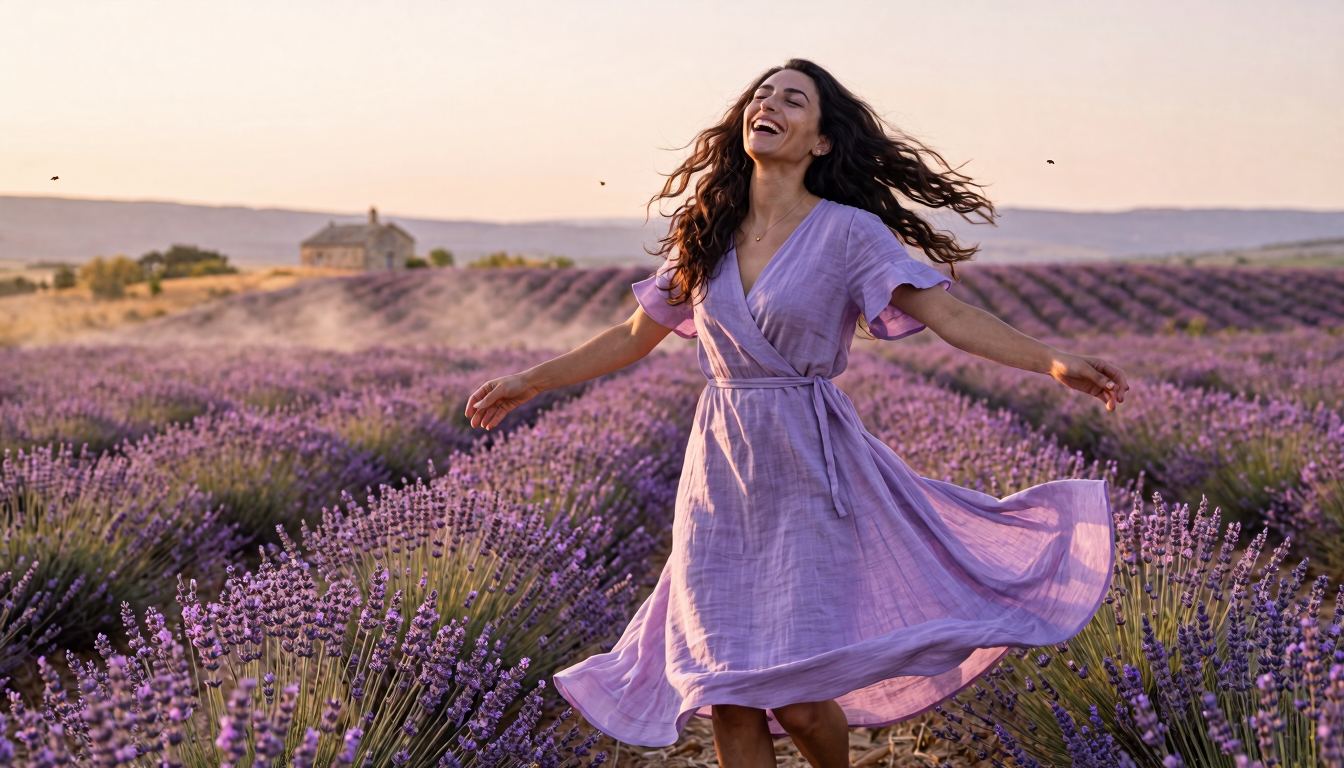
Photorealistic full-scene CG, 1920x1080 landscape. l3yla A young woman
(mid-20s, long dark brown wavy hair caught mid-motion, sweeping outward
in a wide arc from the spin, deep dark brown almond-shaped eyes crinkled
with laughter, defined dark brows, full natural lips parted in a wide
genuine laugh, warm mediterranean olive skin tone, small gold stud
earrings, slim build with soft natural curves) caught mid-twirl in the
middle of a lavender row, weight on one bare foot, the other lifted off
the ground behind her, both arms spread wide and slightly raised, head
thrown back in laughter, eyes nearly closed. Strands of hair lifted by
the spin. Motion blur along the trailing hem and hair ends.

Wearing a pale lilac linen wrap dress with elbow-length flutter sleeves
and a long flowy A-line skirt to mid-calf. The skirt billowing outward
in a wide spiral, the wrap front fluttering, soft natural creases in the
linen. Bare arms below the elbow, bare ankles. Small gold stud earrings.

Background: A vast lavender field in southern France style, long straight
rows of blooming purple lavender stretching to the horizon, dust haze in
the air. A single distant stone farmhouse far back in the frame, low
rolling hills, warm late-afternoon sky in soft peach and pale lilac.
Bees and insects barely visible as soft specks.
Camera: medium-wide shot from knees up, low angle close to the lavender
line, slight upward tilt. Warm low side light from the late sun, long
soft shadows, gentle warm rim on hair and dress edge, hazy bokeh in the
distant rows.
Photorealistic visual novel CG, cinematic color grading, dreamy painterly
quality, gentle motion blur, shallow depth of field, fine atmospheric
haze.
2. Wheat field at sunset, mid-twirl backlit by the low sun
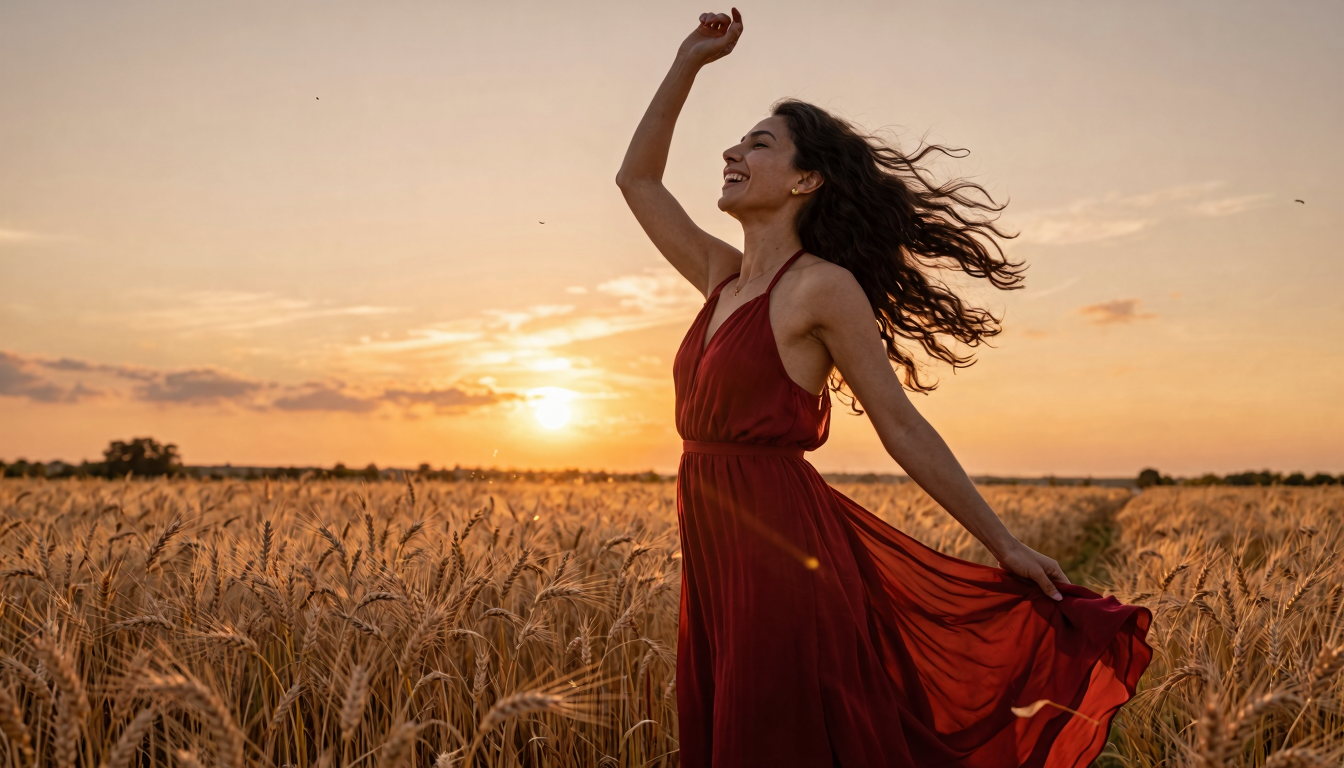
Photorealistic full-scene CG, 1920x1080 landscape. l3yla A young woman
(mid-20s, long dark brown wavy hair caught mid-motion, blown outward and
backward by the spin, deep dark brown almond-shaped eyes crinkled with
laughter, defined dark brows, full natural lips parted in a wide genuine
laugh, warm mediterranean olive skin tone, small gold stud earrings, slim
build with soft natural curves) caught mid-twirl waist-deep in tall
ripe wheat, one hand trailing through the wheat heads at hip level, the
other lifted high overhead, head turned upward and tilted back in
laughter. Wheat stalks bending around her hips, a few seedheads kicked
loose into the air. Motion blur on the dress hem, hair tips and the
trailing hand.

Wearing a deep crimson red flowy maxi dress, thin halter neckline, long
loose skirt to ankle, lightweight crepe fabric. The lower half of the
skirt billowing outward and lifting from the spin, fabric folds catching
the warm light. Bare arms, bare shoulders. Small gold stud earrings.

Background: Vast ripe wheat field at sunset, golden-amber wheat stalks
chest to shoulder high, gently bent by a breeze. Low sun touching the
horizon, sky in deep amber, peach and warm magenta. Distant tree
silhouette on the horizon. A few birds far off in the sky as small specks.
No buildings.
Camera: medium-wide shot from waist up with wheat in the lower third of
frame, slight low angle. Strong warm sunset backlight glowing through her
hair and through the red dress, deep saturated golden hour palette, long
lens compression, lens flare from the low sun.
Photorealistic visual novel CG, cinematic color grading, Malick-style
naturalistic warmth, gentle motion blur, shallow depth of field, fine
atmospheric backlight haze.
3. Windswept coastal cliff, twirling in cream linen against grey ocean
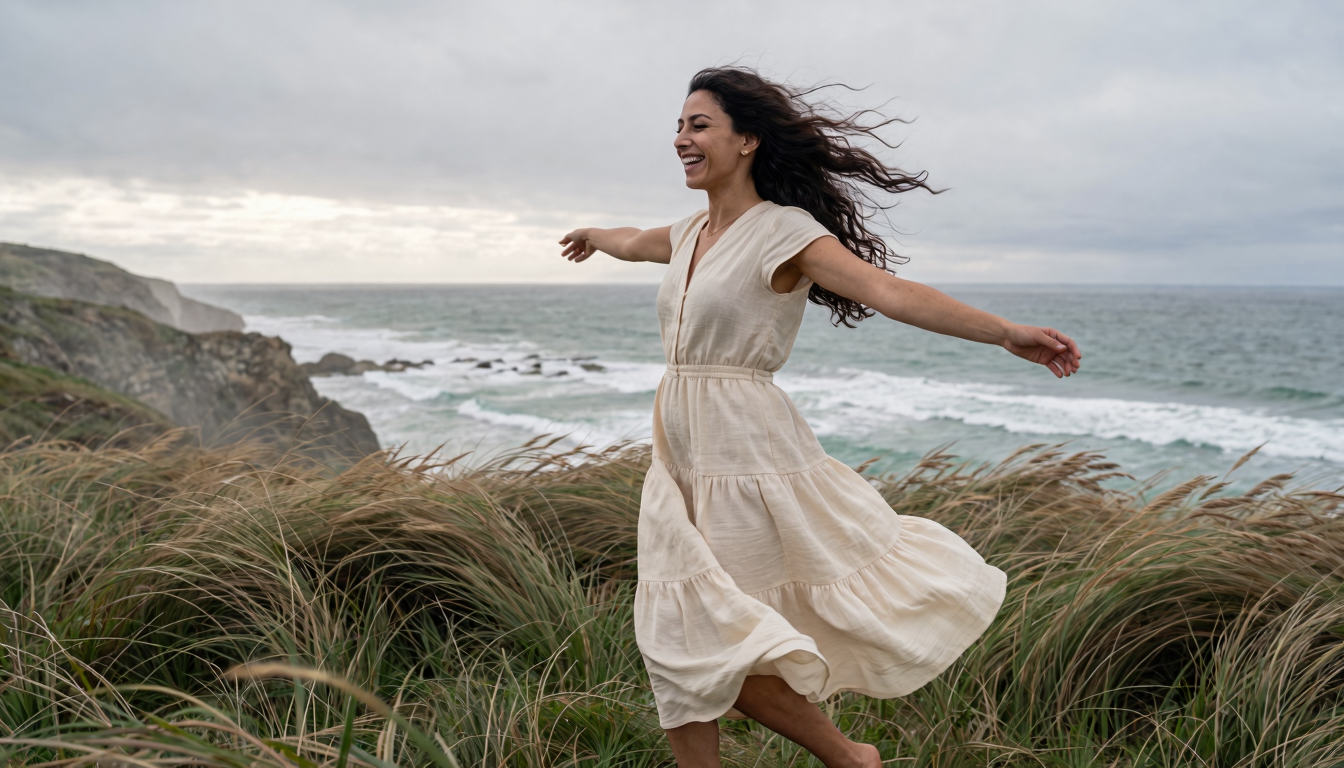
Photorealistic full-scene CG, 1920x1080 landscape. l3yla A young woman
(mid-20s, long dark brown wavy hair caught mid-motion, blown sideways in
a strong wide arc from the spin combined with sea wind, deep dark brown
almond-shaped eyes crinkled with laughter, defined dark brows, full
natural lips parted in an open genuine laugh, warm mediterranean olive
skin tone, small gold stud earrings, slim build with soft natural curves)
caught mid-twirl on a grassy coastal cliff top, weight on one bare foot,
the other foot lifted off the ground behind her, both arms outstretched
horizontally, head turned to one side mid-laugh. Tall coastal grass
whipped sideways by the same wind moving her dress and hair. Strong
motion blur on hem, hair and grass.

Wearing a tiered cream linen midi dress with cap sleeves and a long
gathered skirt. The skirt and lower tier flaring and lifting sharply to
one side from wind and motion combined, fabric pressed flat against one
hip and ballooning outward on the other. Bare arms, bare legs below the
knee. Small gold stud earrings.

Background: A wild grassy cliff top high above the ocean. Tall windswept
beach grass bent sideways by sea wind. Beyond the cliff edge: open ocean,
deep grey-green water with white-capped waves, low overcast sky in soft
silver-grey with a faint break of light near the horizon. Salt mist in
the air. No buildings, no boats.
Camera: medium-wide shot from knees up, slight low angle from the seaward
side so the ocean fills the background behind her. Soft diffused overcast
light, cool desaturated palette, even soft shadows, fine mist in the air
softening distant horizon.
Photorealistic visual novel CG, cinematic color grading, naturalistic
coastal mood, strong motion blur on dress hem hair and grass, shallow
depth of field, atmospheric salt haze, slightly desaturated cool tones.
4. Rainy neon crosswalk, mid-stride neo-noir
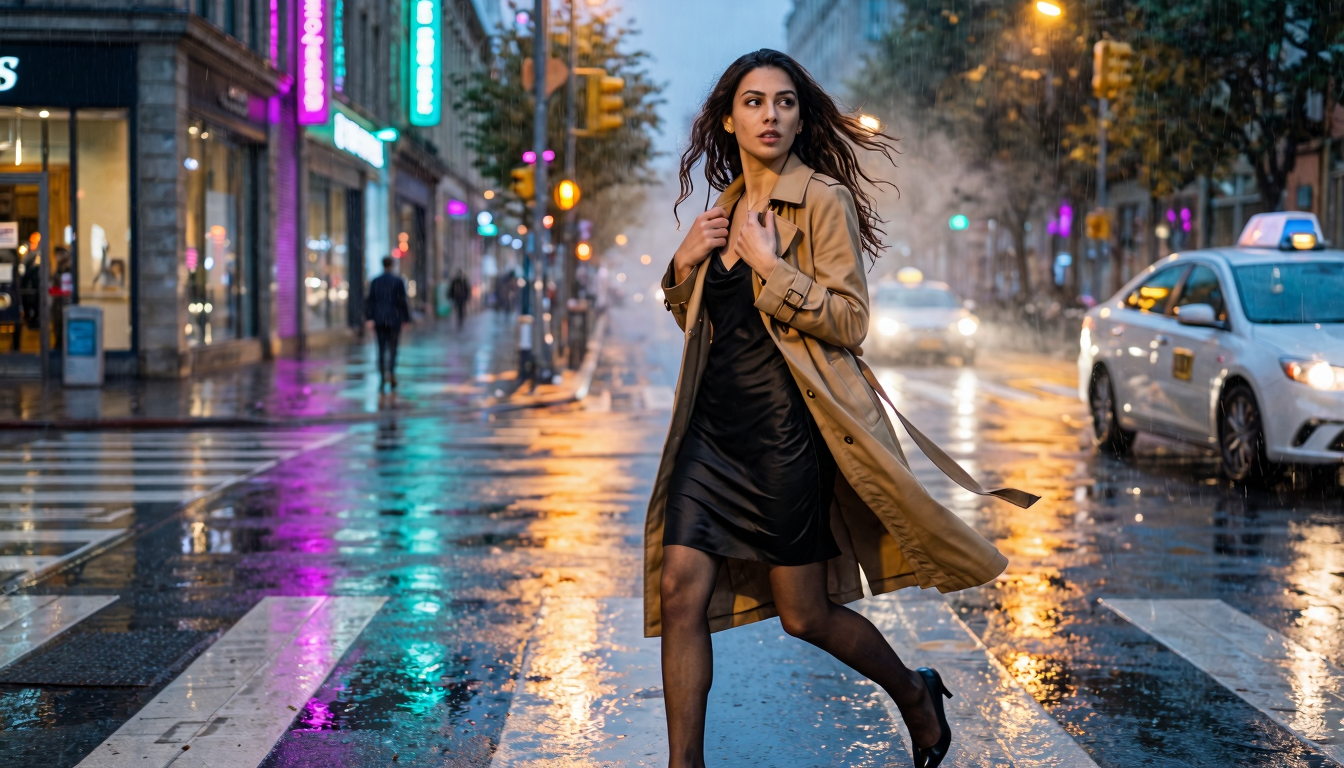
Photorealistic full-scene CG, 1920x1080 landscape. l3yla A young woman
(mid-20s, long dark brown wavy hair, slightly damp from rain and lifted
by her stride, deep dark brown almond-shaped eyes, defined dark brows,
full natural lips, warm mediterranean olive skin tone, small gold stud
earrings, slim build) caught mid-stride crossing a wet city crosswalk
at night, one heel just touching the asphalt, the other leg lifted
behind. One hand clutching the lapel of her open trench coat near her
collarbone, the other hand at her side holding a small clutch bag. Head
turned to look back over her shoulder toward the source of light, lips
parted as if about to speak, calm focused expression. Hair lifting
backward from forward motion.

Wearing a long camel-tan belted trench coat hanging open, a black silk
slip dress underneath ending at mid-thigh, sheer black hosiery, simple
black pointed-toe heels. Belt of the coat tied loosely at the waist.
Coat flaring slightly behind her from movement.

Background: A wide wet city crosswalk at night. White crosswalk paint
reflecting blurred warm headlight glare from a stopped taxi just out of
frame on her right side. Wet asphalt mirroring deep cyan and magenta
neon from shop signs across the intersection. Blurred yellow traffic
light above. A distant pedestrian silhouette far back. Mist in the air,
light rain still falling, visible streaks under the headlights.
Camera: medium shot from knees up, low angle close to the asphalt looking
slightly up, three-quarter view. Strong warm headlight key from one side
casting hard rim, mixed cyan/magenta neon fill from the other, wet
reflections doubling the light sources.
Photorealistic visual novel CG, cinematic color grading, cinematic
neo-noir tone, motion blur on coat hem and hair tips, wet street
reflections, atmospheric rain haze.
5. Late-night diner booth, dual-temperature window light
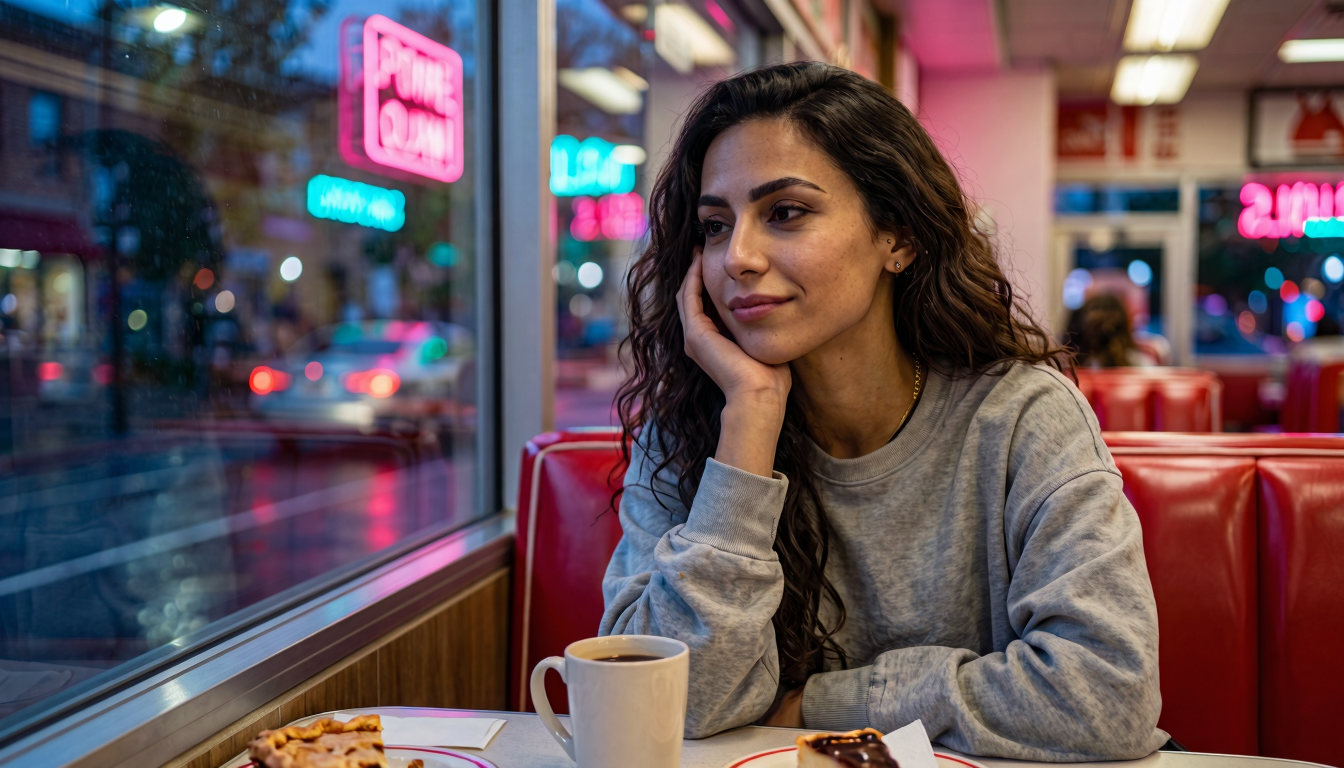
Photorealistic full-scene CG, 1920x1080 landscape. l3yla A young woman
(mid-20s, long dark brown wavy hair pulled into a messy low bun with
loose strands falling around her face, deep dark brown almond-shaped
eyes, defined dark brows, full natural lips, warm mediterranean olive
skin tone, small gold stud earrings, slim build) sitting alone in a red
vinyl diner booth late at night, elbow propped on the window-side table,
chin resting in her palm, the other hand wrapped around a thick ceramic
coffee mug. Looking out the window past the camera with a quiet tired
half-smile, eyes a little soft from late hour. Her reflection faintly
visible in the window glass.

Wearing an oversized faded grey hooded sweatshirt, sleeves pushed up to
her elbows, a thin gold chain barely visible at the collar. A scrap of
black tank-top strap visible under the hoodie neckline.

Background: A 24-hour American diner interior at night. Red vinyl booth,
chrome edges, formica table with the coffee mug, a half-eaten slice of
pie on a plate, a paper napkin. Through the large window beside her: a
wet city street at night with blurred neon signs in magenta and cyan,
a single passing car as streaks of red taillights. Soft warm tungsten
light overhead inside the diner.
Camera: medium-close shot from waist up, eye level across the table,
three-quarter view of her face, with the window filling the left side
of the frame. Warm tungsten key light from inside on the room-side of
her face, cool magenta/cyan fill from the window neon on the other
side, soft contrast between interior warmth and exterior cold.
Photorealistic visual novel CG, cinematic color grading, cinematic late-
night mood, gentle film grain, sharp focus on her face, blurred neon
bokeh through the window.
6. Taxi back seat at night, magenta sweep across the face
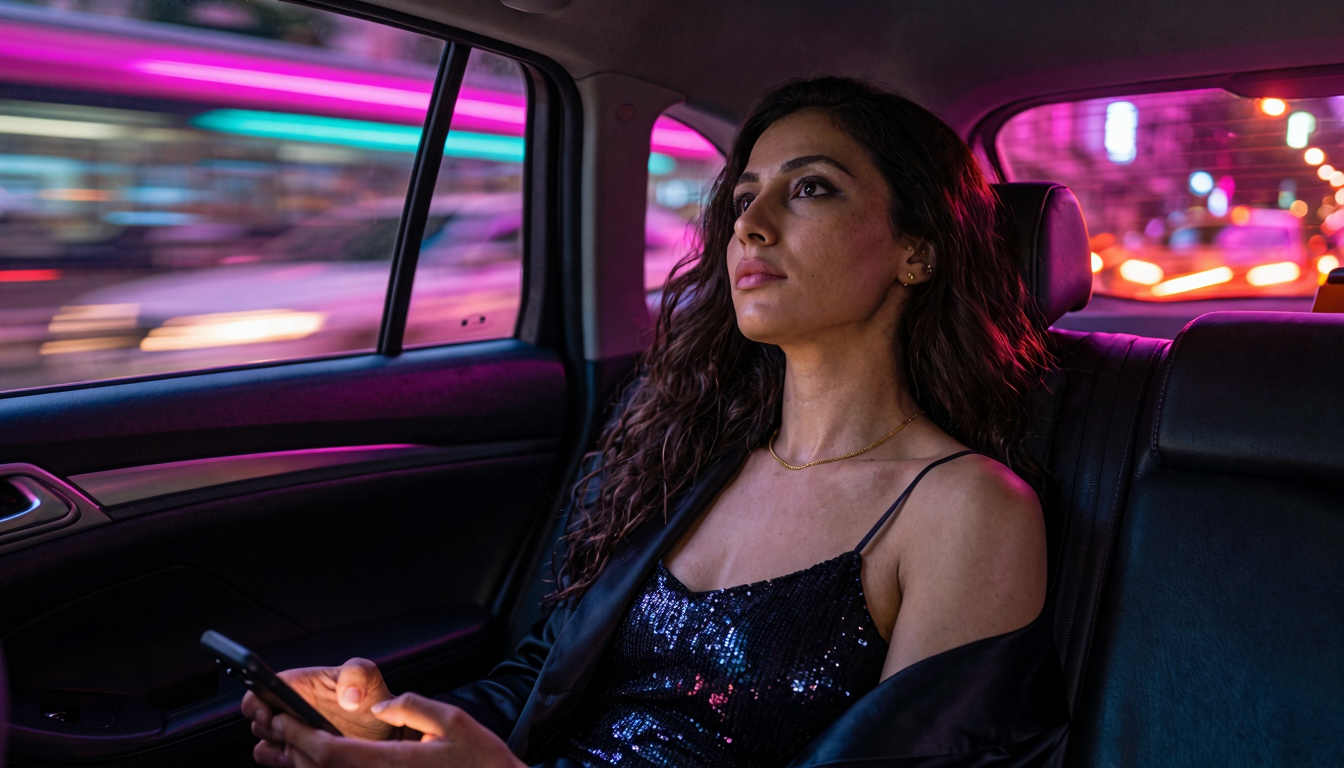
Photorealistic full-scene CG, 1920x1080 landscape. l3yla A young woman
(mid-20s, long dark brown wavy hair loose, falling over one shoulder,
slightly tousled from the night, deep dark brown almond-shaped eyes,
defined dark brows, full natural lips, warm mediterranean olive skin
tone, small gold stud earrings, slim build) sitting in the back seat
of a moving taxi at night, head leaned back against the headrest,
temple resting against the side window. One hand limp in her lap, the
other holding a phone face-down on her thigh. Looking up and out
through the window with a faraway tired calm expression, lips softly
closed, eyes slightly unfocused. A streak of magenta neon light moving
across the top half of her face from the passing street outside.

Wearing a small black sequinned camisole with thin straps, exposed
collarbones and bare shoulders, a black satin blazer slipping off one
shoulder and pooled around her waist. A delicate gold chain at the
neckline. Faint smudge of dark eye makeup softened by the late hour.

Background: Interior of a taxi back seat at night. Dark fabric
upholstery, the rear window behind her showing blurred streaks of
magenta, cyan and amber neon flying past, a few sharp light streaks
from oncoming headlights. A faint dashboard glow visible at the edge
of the frame in soft red-orange. Slight motion smear in everything
outside the window.
Camera: medium-close shot from chest up, eye level, three-quarter view
from the seat beside her. Strong cool magenta/cyan side key from the
window light moving across her face, soft warm orange rim from the
dashboard on the opposite side, deep shadow under her jaw.
Photorealistic visual novel CG, cinematic color grading, cinematic
neon-noir tone, motion blur on lights through window, sharp focus on
her face, fine skin texture, subtle film grain.
7. Standing in front of a bedroom mirror, back and reflection in one frame
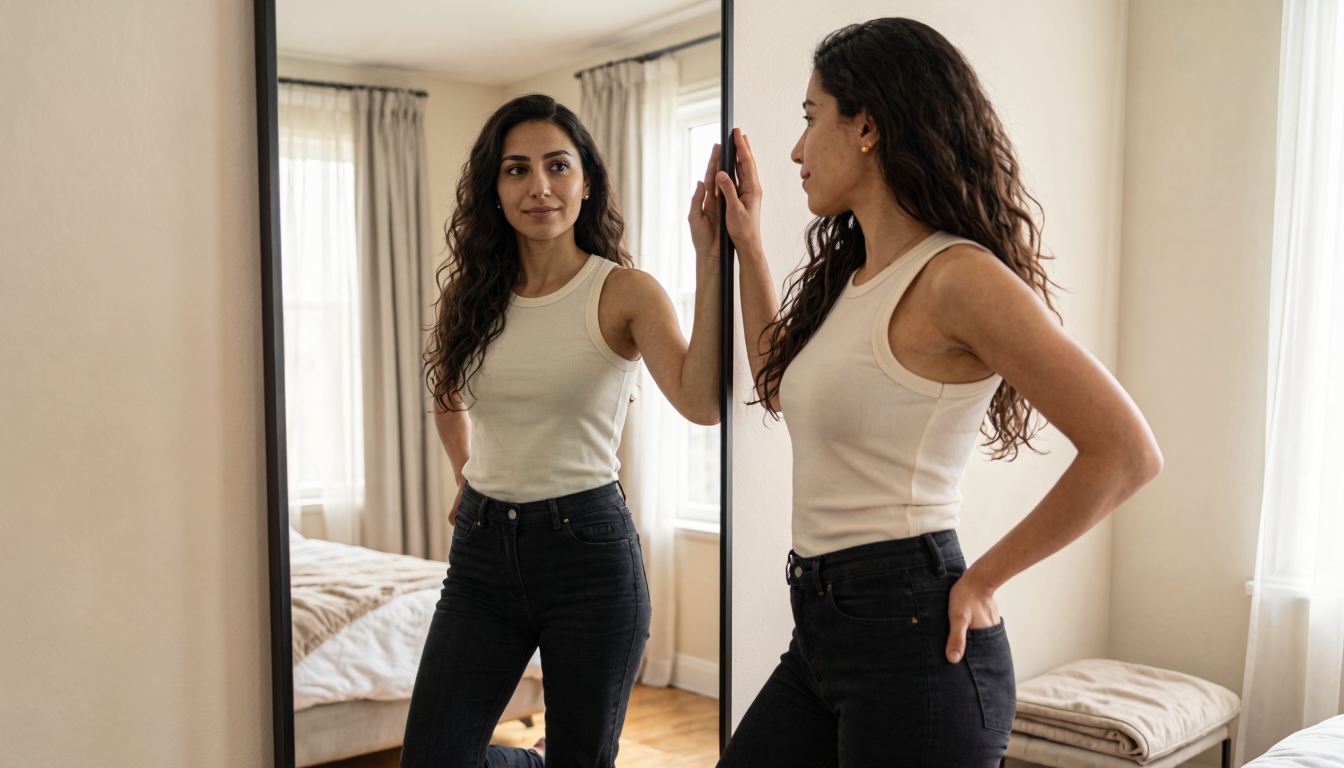
Photorealistic full-scene CG, 1920x1080 landscape. l3yla A young woman
(mid-20s, long dark brown wavy hair with natural volume falling past
shoulders, deep dark brown almond-shaped eyes, defined dark brows, full
natural lips, warm mediterranean olive skin tone, small gold stud
earrings, slim build with soft natural curves) standing close to a
large full-length mirror leaning against a bedroom wall, seen from
behind. Her hair falls loose down her back. One hand lifted, fingertips
just touching the edge of the mirror frame, the other resting at her
hip. Weight on one leg, the other knee slightly bent. In the mirror her
own front-facing reflection looks directly back at the viewer with a
calm steady expression, lips softly closed, a faint thoughtful half-
smile. The reflection is sharp, correctly oriented, and matches her
exact pose: same hand raised toward the frame, same hip cocked, same
hair fall.

Wearing a fitted cream-colored ribbed cotton tank top and high-waist
black denim jeans. The same outfit visible in the mirror reflection.
Bare feet on a wooden floor. Same gold stud earrings visible on both
sides.

Background: A simple bright bedroom. Cream-painted wall, pale wooden
floor, a folded throw blanket on a low bench beside the mirror. In the
mirror's reflection: the opposite side of the room is visible — a
window with sheer curtains glowing with soft daylight, an unmade bed
with white linens slightly visible in the corner of the reflection.
The reflected room is plausibly the same room viewed from the opposite
angle.
Camera: medium shot from mid-thigh up, eye level, slightly behind and
to the side of her so both her back and her mirrored face fit cleanly
in the frame. Even soft daylight from window, no harsh shadows.
Photorealistic visual novel CG, cinematic color grading, sharp mirror
reflection, fine skin texture, subtle film grain.
Gotchas (worth knowing before you start)
Gemini's "public figure" intermittent refusal
After ~5–10 images of the same person in the same chat, Gemini sometimes refuses with:
"I can help with images of people, but I can't depict some public figures. Is there anyone else you'd like to try?"
This is a false positive — the long chat history trips a safety heuristic, not your prompt. The woman is synthetic; Gemini just lost the plot.
Fix: start a fresh chat, re-attach leyla.png, paste the same prompt. It works. As a habit, rotate to a new chat every 5 images.
Tuning the appearance block mid-dataset
If you decide partway through that "warm olive skin" should be "light olive skin", change it in all 30 prompts in one find-and-replace pass. Mixing variants across the dataset is the fastest way to a LoRA that "kinda looks like her, but not really".
Cropping is non-negotiable
A LoRA trained on watermarked images stamps a watermark on every inference output. Always run crop_watermark.py between dataset generation and training.
Fitting on less VRAM
Heads-up: this guide's config already pegs a 16GB card at the ceiling, so a 12GB card is in for a real fight. The standard knobs to turn (batch size is already 1 in this config, so the easier wins are elsewhere):
- Drop LoRA rank from 32 → 16 or 8 — biggest VRAM win, smallest quality hit on a single-character LoRA.
- Raise gradient accumulation from 1 → 4 or 8 to keep the effective batch size up while staying at per-step batch 1.
- Flip Low VRAM and Layer Offloading on in the MODEL panel (both were off in our config) — they trade training speed for memory headroom.
- Turn on Cache Text Embeddings + Unload TE in the TRAINING panel — frees ~1.5–2 GB by evicting the text encoder once captions are encoded.
Expect to iterate on the config until something fits without OOM. Quality should land in the same ballpark — the math is the same, you're trading wall-clock time and a few quality points for memory headroom. Untested by this guide; your mileage will vary.
What's next
- Train a second character with the same pipeline. The cost is the 30-image dataset + 6h GPU time; everything else is reusable.
- Train a style LoRA on top — pick a consistent visual style (anime cel-shaded, oil-painting, photorealistic film grain) and stack it with the character LoRA at inference. Z-Image-Turbo handles two LoRAs at once without obvious quality loss.
- For a longer-form visual novel: keep the dataset folder, the captions, and the training config in version control. When the model updates (Z-Image v2, anyone?), you can re-train all your character LoRAs from the same source data in one batch.
The full 30-prompt set plus this guide's reference materials are in the download bundle below — fork it for your own characters.